Quantcast
Channel: Android point
Viewing all 106 articles
Browse latest View live

JPG File Chooser

$
0
0
Main layout:


Main code:

package com.AndroidCustomDialog;

import java.io.File;
import java.util.ArrayList;
import java.util.List;

import android.app.Activity;
import android.app.Dialog;
import android.graphics.Bitmap;
import android.graphics.BitmapFactory;
import android.net.Uri;
import android.os.Bundle;
import android.os.Environment;
import android.view.View;
import android.view.View.OnClickListener;
import android.webkit.MimeTypeMap;
import android.widget.AdapterView;
import android.widget.AdapterView.OnItemClickListener;
import android.widget.ArrayAdapter;
import android.widget.Button;
import android.widget.ImageView;
import android.widget.ListView;
import android.widget.TextView;
import android.widget.Toast;

public class AndroidCustomDialogActivity extends Activity {

Button buttonOpenDialog;
Button buttonUp;
TextView textFolder;
ImageView image;

String KEY_TEXTPSS = "TEXTPSS";
static final int CUSTOM_DIALOG_ID = 0;

ListView dialog_ListView;

File root;
File curFolder;

private List fileList = new ArrayList();

/** Called when the activity is first created. */
@Override
public void onCreate(Bundle savedInstanceState) {
super.onCreate(savedInstanceState);
setContentView(R.layout.main);

image = (ImageView)findViewById(R.id.image);

buttonOpenDialog = (Button)findViewById(R.id.opendialog);
buttonOpenDialog.setOnClickListener(new Button.OnClickListener(){

@Override
public void onClick(View arg0) {
showDialog(CUSTOM_DIALOG_ID);
}});

root = new File(Environment
.getExternalStorageDirectory()
.getAbsolutePath());

curFolder = root;

}

@Override
protected Dialog onCreateDialog(int id) {

Dialog dialog = null;

switch(id) {
case CUSTOM_DIALOG_ID:
dialog = new Dialog(AndroidCustomDialogActivity.this);
dialog.setContentView(R.layout.dialoglayout);
dialog.setTitle("Select JPG");

dialog.setCancelable(true);
dialog.setCanceledOnTouchOutside(true);

textFolder = (TextView)dialog.findViewById(R.id.folder);

buttonUp = (Button)dialog.findViewById(R.id.up);
buttonUp.setOnClickListener(new OnClickListener(){

@Override
public void onClick(View v) {
// TODO Auto-generated method stub
ListDir(curFolder.getParentFile());
}});

//Prepare ListView in dialog
dialog_ListView = (ListView)dialog.findViewById(R.id.dialoglist);

dialog_ListView.setOnItemClickListener(new OnItemClickListener(){

@Override
public void onItemClick(AdapterView parent, View view,
int position, long id) {

File selected = new File(fileList.get(position));
if(selected.isDirectory()){
ListDir(selected);
}else {
Toast.makeText(AndroidCustomDialogActivity.this,
selected.toString() + " selected",
Toast.LENGTH_LONG).show();
dismissDialog(CUSTOM_DIALOG_ID);

Bitmap bm = BitmapFactory.decodeFile(selected.getAbsolutePath());
image.setImageBitmap(bm);

}

}});

break;
}

return dialog;
}

@Override
protected void onPrepareDialog(int id, Dialog dialog, Bundle bundle) {
// TODO Auto-generated method stub
super.onPrepareDialog(id, dialog, bundle);

switch(id) {
case CUSTOM_DIALOG_ID:
ListDir(curFolder);
break;
}

}

void ListDir(File f){

if(f.equals(root)){
buttonUp.setEnabled(false);
}else{
buttonUp.setEnabled(true);
}

curFolder = f;
textFolder.setText(f.getPath());

File[] files = f.listFiles();
fileList.clear();
for (File file : files){

if(file.isDirectory()){
fileList.add(file.getPath());
}else{
Uri selectedUri = Uri.fromFile(file);
String fileExtension
= MimeTypeMap.getFileExtensionFromUrl(selectedUri.toString());
if(fileExtension.equalsIgnoreCase("jpg")){
fileList.add(file.getPath());
}
}

}

ArrayAdapter directoryList
= new ArrayAdapter(this,
android.R.layout.simple_list_item_1, fileList);
dialog_ListView.setAdapter(directoryList);
}

}
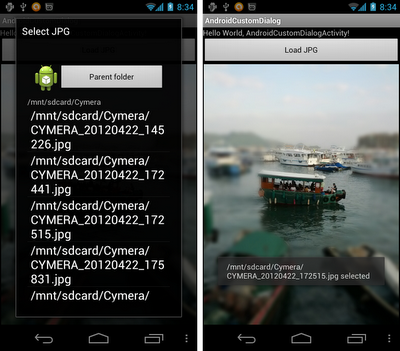


JPG File Chooser
 Cheers Guys!

Gets IP addresses of a given host - InetAddress.getAllByName()

$
0
0
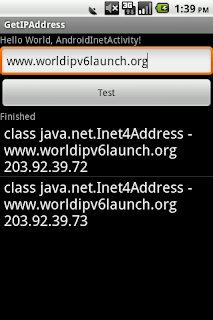
java.net.InetAddress is a class of Internet Protocol (IP) address. This can be either an IPv4 address or an IPv6 address, and in practice you'll have an instance of either Inet4Address or Inet6Address (this class cannot be instantiated directly). Most code does not need to distinguish between the two families, and should use InetAddress.

The method getAllByName() gets all IP addresses associated with the given host identified by name or literal IP address. The IP address is resolved by the configured name service. If the host name is empty or null an UnknownHostException is thrown. If the host name is a literal IP address string an array with the corresponding single InetAddress is returned.

This example list all IP addresses associated with the user enter host name.

Note:

"android.permission.INTERNET" is needed.

For Applications targeting the Honeycomb SDK or higher, cannot attempts to perform a networking operation on its main thread. Otherwise, NetworkOnMainThreadException will be thrown. So the network operation is moved into AsyncTask.

I haven't IPv6 connection currently, I don't know if it will show Inet6Address with IPv6 connection. If you have, please let me know.

Java Code:


package com.AndroidInet;

import java.net.InetAddress;
import java.net.UnknownHostException;
import java.util.ArrayList;
import java.util.List;

import android.app.Activity;
import android.os.AsyncTask;
import android.os.Bundle;
import android.view.View;
import android.view.View.OnClickListener;
import android.widget.ArrayAdapter;
import android.widget.Button;
import android.widget.EditText;
import android.widget.ListView;
import android.widget.TextView;

public class AndroidInetActivity extends Activity {

EditText hostinput;
TextView info;
Button btnTest;
ListView resultList;

/** Called when the activity is first created. */
@Override
public void onCreate(Bundle savedInstanceState) {
super.onCreate(savedInstanceState);
setContentView(R.layout.main);
hostinput = (EditText)findViewById(R.id.testhost);
info = (TextView)findViewById(R.id.info);
resultList = (ListView)findViewById(R.id.result);
btnTest = (Button)findViewById(R.id.test);
btnTest.setOnClickListener(new OnClickListener(){

@Override
public void onClick(View view) {
info.setText("Wait...");
new Task().execute();

}});
}


private class Task extends AsyncTask{
Boolean error = false;
String error_info = "";
InetAddress[] inetAddress = null;

List hostList = new ArrayList();

@Override
protected Void doInBackground(Void... arg0) {
doTest();
return null;
}

@Override
protected void onPostExecute(Void result) {
if(error){
info.setText("Error: \n" + error_info);
}else{
info.setText("Finished");

ArrayAdapter adapter
= new ArrayAdapter(
AndroidInetActivity.this,
android.R.layout.simple_list_item_1,
hostList);

resultList.setAdapter(adapter);
}

super.onPostExecute(result);
}

private void doTest(){

String host = hostinput.getText().toString();

try {
inetAddress = InetAddress.getAllByName(host);

for(int i = 0; i < inetAddress.length; i++){

hostList.add(inetAddress[i].getClass() + " -\n"
+ inetAddress[i].getHostName() + "\n"
+ inetAddress[i].getHostAddress());
}

} catch (UnknownHostException e) {

e.printStackTrace();

error = true;
error_info = e.toString();
}

}
}
}

XML Code:


Cheers Guys!!!!!

Implement custom dialog to open folder

$
0
0
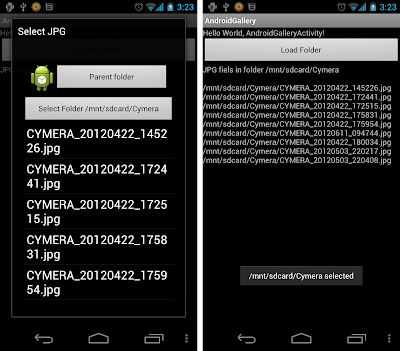
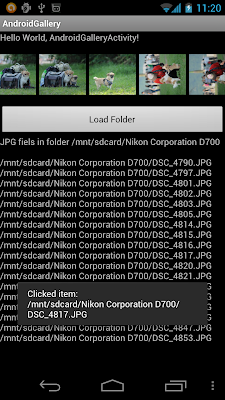
Custom dialog was implemented to load individual image(jpg). In this article, the custom dialog is used to open folder, instead of individual file. After dismissed, the images(jpg) in the selected folder will be listed.

dialoglayout.xml, layout of the custom dislog.


AndroidGalleryActivity.java, the main code.


package com.AndroidGallery;

import java.io.File;
import java.util.ArrayList;
import java.util.List;

import android.app.Activity;
import android.app.Dialog;
import android.net.Uri;
import android.os.Bundle;
import android.os.Environment;
import android.view.View;
import android.view.View.OnClickListener;
import android.webkit.MimeTypeMap;
import android.widget.AdapterView;
import android.widget.AdapterView.OnItemClickListener;
import android.widget.ArrayAdapter;
import android.widget.Button;
import android.widget.ListView;
import android.widget.TextView;
import android.widget.Toast;

public class AndroidGalleryActivity extends Activity {

Button buttonOpenDialog;
Button buttonUp, buttonSelectFolder;
TextView jpgList;

String KEY_TEXTPSS = "TEXTPSS";
static final int CUSTOM_DIALOG_ID = 0;

ListView dialog_ListView;

File root;
File curFolder;

private List fileList = new ArrayList();

/** Called when the activity is first created. */
@Override
public void onCreate(Bundle savedInstanceState) {
super.onCreate(savedInstanceState);
setContentView(R.layout.main);

jpgList = (TextView)findViewById(R.id.jpglist);

buttonOpenDialog = (Button)findViewById(R.id.opendialog);
buttonOpenDialog.setOnClickListener(new Button.OnClickListener(){
@Override
public void onClick(View arg0) {
showDialog(CUSTOM_DIALOG_ID);
}});

root = new File(Environment
.getExternalStorageDirectory()
.getAbsolutePath());

curFolder = root;
ListJpgInFolder(curFolder);

}

@Override
protected Dialog onCreateDialog(int id) {

Dialog dialog = null;

switch(id) {
case CUSTOM_DIALOG_ID:
dialog = new Dialog(AndroidGalleryActivity.this);
dialog.setContentView(R.layout.dialoglayout);
dialog.setTitle("Select JPG");

dialog.setCancelable(true);
dialog.setCanceledOnTouchOutside(true);

buttonUp = (Button)dialog.findViewById(R.id.up);
buttonUp.setOnClickListener(new OnClickListener(){

@Override
public void onClick(View v) {
// TODO Auto-generated method stub
ListDir(curFolder.getParentFile());
}});

buttonSelectFolder = (Button)dialog.findViewById(R.id.selectfolder);
buttonSelectFolder.setOnClickListener(new OnClickListener(){

@Override
public void onClick(View v) {
// TODO Auto-generated method stub
Toast.makeText(AndroidGalleryActivity.this,
curFolder + " selected",
Toast.LENGTH_LONG).show();
dismissDialog(CUSTOM_DIALOG_ID);

ListJpgInFolder(curFolder);

}});


//Prepare ListView in dialog
dialog_ListView = (ListView)dialog.findViewById(R.id.dialoglist);

dialog_ListView.setOnItemClickListener(new OnItemClickListener(){

@Override
public void onItemClick(AdapterView parent, View view,
int position, long id) {
File selected = new File(fileList.get(position));
if(selected.isDirectory()){
ListDir(selected);
}else {
/*
Toast.makeText(AndroidGalleryActivity.this,
selected.toString() + " selected",
Toast.LENGTH_LONG).show();
dismissDialog(CUSTOM_DIALOG_ID);

Bitmap bm = BitmapFactory.decodeFile(selected.getAbsolutePath());
image.setImageBitmap(bm);
*/
}
}});

break;
}
return dialog;
}

@Override
protected void onPrepareDialog(int id, Dialog dialog, Bundle bundle) {
// TODO Auto-generated method stub
super.onPrepareDialog(id, dialog, bundle);

switch(id) {
case CUSTOM_DIALOG_ID:
ListDir(curFolder);

break;
}
}

void ListDir(File f){

if(f.equals(root)){
buttonUp.setEnabled(false);
}else{
buttonUp.setEnabled(true);
}

curFolder = f;
buttonSelectFolder.setText("Select Folder " + curFolder);

File[] files = f.listFiles();
fileList.clear();
for (File file : files){
if(file.isDirectory()){
fileList.add(file.getPath());
}else{
Uri selectedUri = Uri.fromFile(file);
String fileExtension
= MimeTypeMap.getFileExtensionFromUrl(selectedUri.toString());
if(fileExtension.equalsIgnoreCase("jpg")){
fileList.add(file.getName());
}
}
}

ArrayAdapter directoryList
= new ArrayAdapter(this,
android.R.layout.simple_list_item_1, fileList);
dialog_ListView.setAdapter(directoryList);
}

private void ListJpgInFolder(File folder){
String jpgs = "JPG fiels in folder " + folder.getAbsolutePath() + "\n\n";
File[] files = folder.listFiles();
for (File file : files){
if(!file.isDirectory()){
Uri selectedUri = Uri.fromFile(file);
String fileExtension
= MimeTypeMap.getFileExtensionFromUrl(selectedUri.toString());
if(fileExtension.equalsIgnoreCase("jpg")){
jpgs += file.getAbsolutePath() + "\n";
}
}
}

jpgList.setText(jpgs);
}

}

main.xml, the main layout.


custom dialog to open folder

Display photos from SD in android.widget.Gallery

$
0
0
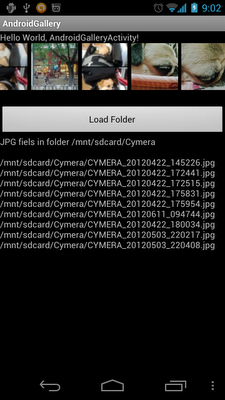
The photos in the selected folder will be loaded in a custom adapter to display in Gallery widget.

Modify main.xml, to add <Gallery>.


Modify AndroidGalleryActivity.java.

In order to reduce the resource need to keep the bitmaps, we have to implement a new class PhotoItem hold the path of individual jpg file, and the re-sized bitmap. And a custom BaseAdapter, PhotoBarAdapter, for PhotoItem is implemented for the Gallery.


package com.AndroidGallery;

import java.io.File;
import java.util.ArrayList;
import java.util.List;

import android.R.color;
import android.app.Activity;
import android.app.Dialog;
import android.content.Context;
import android.graphics.Bitmap;
import android.graphics.BitmapFactory;
import android.net.Uri;
import android.os.Bundle;
import android.os.Environment;
import android.view.View;
import android.view.View.OnClickListener;
import android.view.ViewGroup;
import android.webkit.MimeTypeMap;
import android.widget.AdapterView;
import android.widget.AdapterView.OnItemClickListener;
import android.widget.ArrayAdapter;
import android.widget.BaseAdapter;
import android.widget.Button;
import android.widget.Gallery;
import android.widget.ImageView;
import android.widget.LinearLayout;
import android.widget.ListView;
import android.widget.TextView;
import android.widget.Toast;

public class AndroidGalleryActivity extends Activity {

Gallery photoBar;

Button buttonOpenDialog;
Button buttonUp, buttonSelectFolder;
TextView jpgList;

String KEY_TEXTPSS = "TEXTPSS";
static final int CUSTOM_DIALOG_ID = 0;

ListView dialog_ListView;

File root;
File curFolder;

private List fileList = new ArrayList();

class PhotoItem{

String bitmapImageSrc;
Bitmap bitmapImage = null;

final static int itemWidth = 150;
final static int itemHeight = 150;

public PhotoItem(String src){
bitmapImageSrc = src;
bitmapImage = resize();
}

public Bitmap getImage(){
return bitmapImage;
}

private Bitmap resize(){
BitmapFactory.Options bmpFactoryOptions = new BitmapFactory.Options();
bmpFactoryOptions.inJustDecodeBounds = true;

Bitmap bitmap = BitmapFactory.decodeFile(bitmapImageSrc, bmpFactoryOptions);

int heightRatio = (int)Math.ceil(bmpFactoryOptions.outHeight/(float)itemHeight);
int widthRatio = (int)Math.ceil(bmpFactoryOptions.outWidth/(float)itemWidth);

if (heightRatio > 1 || widthRatio > 1)
{
if (heightRatio > widthRatio){
bmpFactoryOptions.inSampleSize = heightRatio;
} else {
bmpFactoryOptions.inSampleSize = widthRatio;
}
}

bmpFactoryOptions.inJustDecodeBounds = false;

bitmap = BitmapFactory.decodeFile(bitmapImageSrc, bmpFactoryOptions);

return bitmap;
}
}

PhotoBarAdapter myPhotoBarAdapter;

public class PhotoBarAdapter extends BaseAdapter {

Context context;
ArrayList arrayPhotoItem;


PhotoBarAdapter(Context c){
context = c;
arrayPhotoItem = new ArrayList();
}

public void clear(){
arrayPhotoItem.clear();
}

public void addPhotoItem(PhotoItem item){
arrayPhotoItem.add(item);
}

@Override
public int getCount() {
return arrayPhotoItem.size();
}

@Override
public Object getItem(int position) {
return arrayPhotoItem.get(position);
}

@Override
public long getItemId(int position) {
return position;
}

@Override
public View getView(int position, View convertView, ViewGroup parent) {

LinearLayout viewLayout = new LinearLayout(context);
viewLayout.setLayoutParams(new Gallery.LayoutParams(200, 200));
viewLayout.setBackgroundColor(color.background_light);

ImageView imageView;
imageView = new ImageView(context);
imageView.setLayoutParams(new Gallery.LayoutParams(150, 150));
imageView.setScaleType(ImageView.ScaleType.CENTER_CROP);
imageView.setImageBitmap(arrayPhotoItem.get(position).getImage());
//return imageView;

viewLayout.addView(imageView);
return viewLayout;
}

}

/** Called when the activity is first created. */
@Override
public void onCreate(Bundle savedInstanceState) {
super.onCreate(savedInstanceState);
setContentView(R.layout.main);

photoBar = (Gallery)findViewById(R.id.photobar);
myPhotoBarAdapter = new PhotoBarAdapter(this);
photoBar.setAdapter(myPhotoBarAdapter);

jpgList = (TextView)findViewById(R.id.jpglist);

buttonOpenDialog = (Button)findViewById(R.id.opendialog);
buttonOpenDialog.setOnClickListener(new Button.OnClickListener(){
@Override
public void onClick(View arg0) {
showDialog(CUSTOM_DIALOG_ID);
}});

root = new File(Environment
.getExternalStorageDirectory()
.getAbsolutePath());

curFolder = root;
//ListJpgInFolder(curFolder);
preparePhotoBarInFolder(curFolder);

}

@Override
protected Dialog onCreateDialog(int id) {

Dialog dialog = null;

switch(id) {
case CUSTOM_DIALOG_ID:
dialog = new Dialog(AndroidGalleryActivity.this);
dialog.setContentView(R.layout.dialoglayout);
dialog.setTitle("Select JPG");

dialog.setCancelable(true);
dialog.setCanceledOnTouchOutside(true);

buttonUp = (Button)dialog.findViewById(R.id.up);
buttonUp.setOnClickListener(new OnClickListener(){

@Override
public void onClick(View v) {
// TODO Auto-generated method stub
ListDir(curFolder.getParentFile());
}});

buttonSelectFolder = (Button)dialog.findViewById(R.id.selectfolder);
buttonSelectFolder.setOnClickListener(new OnClickListener(){

@Override
public void onClick(View v) {
// TODO Auto-generated method stub
Toast.makeText(AndroidGalleryActivity.this,
curFolder + " selected",
Toast.LENGTH_LONG).show();
dismissDialog(CUSTOM_DIALOG_ID);

//ListJpgInFolder(curFolder);
preparePhotoBarInFolder(curFolder);

}});


//Prepare ListView in dialog
dialog_ListView = (ListView)dialog.findViewById(R.id.dialoglist);

dialog_ListView.setOnItemClickListener(new OnItemClickListener(){

@Override
public void onItemClick(AdapterView parent, View view,
int position, long id) {
File selected = new File(fileList.get(position));
if(selected.isDirectory()){
ListDir(selected);
}
}});

break;
}
return dialog;
}

@Override
protected void onPrepareDialog(int id, Dialog dialog, Bundle bundle) {
// TODO Auto-generated method stub
super.onPrepareDialog(id, dialog, bundle);

switch(id) {
case CUSTOM_DIALOG_ID:
ListDir(curFolder);

break;
}
}

void ListDir(File f){

if(f.equals(root)){
buttonUp.setEnabled(false);
}else{
buttonUp.setEnabled(true);
}

curFolder = f;
buttonSelectFolder.setText("Select Folder " + curFolder);

File[] files = f.listFiles();
fileList.clear();
for (File file : files){
if(file.isDirectory()){
fileList.add(file.getPath());
}else{
Uri selectedUri = Uri.fromFile(file);
String fileExtension
= MimeTypeMap.getFileExtensionFromUrl(selectedUri.toString());
if(fileExtension.equalsIgnoreCase("jpg")){
fileList.add(file.getName());
}
}
}

ArrayAdapter directoryList
= new ArrayAdapter(this,
android.R.layout.simple_list_item_1, fileList);
dialog_ListView.setAdapter(directoryList);
}

private void preparePhotoBarInFolder(File folder){

String jpgs = "JPG fiels in folder " + folder.getAbsolutePath() + "\n\n";

File[] files = folder.listFiles();

myPhotoBarAdapter.clear();

for (File file : files){
if(!file.isDirectory()){
Uri selectedUri = Uri.fromFile(file);
String fileExtension
= MimeTypeMap.getFileExtensionFromUrl(selectedUri.toString());
if(fileExtension.equalsIgnoreCase("jpg")){
jpgs += file.getAbsolutePath() + "\n";

PhotoItem pItem = new PhotoItem(file.getAbsolutePath());
myPhotoBarAdapter.addPhotoItem(pItem);

myPhotoBarAdapter.notifyDataSetChanged();
}
}
}
jpgList.setText(jpgs);
}

}
Display photos from SD in Gallery widget

Update Gallery photos in background thread

$
0
0
Last article "Display photos from SD in android.widget.Gallery" load Gallery photos in UI thread. As I mentioned in some previous posts, it's not a good practice to perform long time operation in UI thread, specially when you load many large size photos.


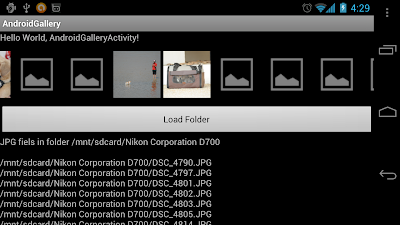
The main code, AndroidGalleryActivity.java, is further modified to perform the re-size job in background thread. Before the photos re-sized, the Gallery show items as a default bitmap (android.R.drawable.ic_menu_gallery). After re-size, myPhotoBarAdapter.notifyDataSetChanged() is called (in UI thread) to update Gallery.

Because every photo have its own background thread to re-size, and independent to each others. So the update sequence is not in order.


package com.AndroidGallery;

import java.io.File;
import java.util.ArrayList;
import java.util.List;

import android.R.color;
import android.app.Activity;
import android.app.Dialog;
import android.content.Context;
import android.graphics.Bitmap;
import android.graphics.BitmapFactory;
import android.net.Uri;
import android.os.Bundle;
import android.os.Environment;
import android.os.Handler;
import android.view.Gravity;
import android.view.View;
import android.view.View.OnClickListener;
import android.view.ViewGroup;
import android.webkit.MimeTypeMap;
import android.widget.AdapterView;
import android.widget.AdapterView.OnItemClickListener;
import android.widget.ArrayAdapter;
import android.widget.BaseAdapter;
import android.widget.Button;
import android.widget.Gallery;
import android.widget.ImageView;
import android.widget.LinearLayout;
import android.widget.ListView;
import android.widget.TextView;
import android.widget.Toast;

public class AndroidGalleryActivity extends Activity {

Gallery photoBar;

Button buttonOpenDialog;
Button buttonUp, buttonSelectFolder;
TextView jpgList;

String KEY_TEXTPSS = "TEXTPSS";
static final int CUSTOM_DIALOG_ID = 0;

ListView dialog_ListView;

File root;
File curFolder;

private List fileList = new ArrayList();

class PhotoItem{

String bitmapImageSrc;
Bitmap bitmapImage = null;

final static int itemWidth = 150;
final static int itemHeight = 150;

Handler handler;

public PhotoItem(String src){
bitmapImageSrc = src;
StratBackgroundProcess();

bitmapImage = BitmapFactory.decodeResource(getResources(), android.R.drawable.ic_menu_gallery);
}

public Bitmap getImage(){
return bitmapImage;
}

private void runResize(){
BitmapFactory.Options bmpFactoryOptions = new BitmapFactory.Options();
bmpFactoryOptions.inJustDecodeBounds = true;

Bitmap bitmap = BitmapFactory.decodeFile(bitmapImageSrc, bmpFactoryOptions);

int heightRatio = (int)Math.ceil(bmpFactoryOptions.outHeight/(float)itemHeight);
int widthRatio = (int)Math.ceil(bmpFactoryOptions.outWidth/(float)itemWidth);

if (heightRatio > 1 || widthRatio > 1)
{
if (heightRatio > widthRatio){
bmpFactoryOptions.inSampleSize = heightRatio;
} else {
bmpFactoryOptions.inSampleSize = widthRatio;
}
}

bmpFactoryOptions.inJustDecodeBounds = false;

bitmapImage = BitmapFactory.decodeFile(bitmapImageSrc, bmpFactoryOptions);

}

private void StratBackgroundProcess(){
Runnable runnable = new Runnable(){

@Override
public void run() {

runResize();

handler.post(new Runnable(){

@Override
public void run() {
myPhotoBarAdapter.notifyDataSetChanged();
}});

}

};

handler = new Handler();
new Thread(runnable).start();
}

}

PhotoBarAdapter myPhotoBarAdapter;

public class PhotoBarAdapter extends BaseAdapter {

Context context;
ArrayList arrayPhotoItem;

PhotoBarAdapter(Context c){
context = c;
arrayPhotoItem = new ArrayList();
}

public void clear(){
arrayPhotoItem.clear();
}

public void addPhotoItem(PhotoItem item){
arrayPhotoItem.add(item);
}

@Override
public int getCount() {
return arrayPhotoItem.size();
}

@Override
public Object getItem(int position) {
return arrayPhotoItem.get(position);
}

@Override
public long getItemId(int position) {
return position;
}

@Override
public View getView(int position, View convertView, ViewGroup parent) {

LinearLayout viewLayout = new LinearLayout(context);
viewLayout.setLayoutParams(new Gallery.LayoutParams(200, 200));
viewLayout.setGravity(Gravity.CENTER);
viewLayout.setBackgroundColor(color.background_light);

ImageView imageView;
imageView = new ImageView(context);
imageView.setLayoutParams(new Gallery.LayoutParams(150, 150));
imageView.setScaleType(ImageView.ScaleType.CENTER_CROP);
imageView.setImageBitmap(arrayPhotoItem.get(position).getImage());
//return imageView;

viewLayout.addView(imageView);
return viewLayout;
}

}

/** Called when the activity is first created. */
@Override
public void onCreate(Bundle savedInstanceState) {
super.onCreate(savedInstanceState);
setContentView(R.layout.main);

photoBar = (Gallery)findViewById(R.id.photobar);
myPhotoBarAdapter = new PhotoBarAdapter(this);
photoBar.setAdapter(myPhotoBarAdapter);

jpgList = (TextView)findViewById(R.id.jpglist);

buttonOpenDialog = (Button)findViewById(R.id.opendialog);
buttonOpenDialog.setOnClickListener(new Button.OnClickListener(){
@Override
public void onClick(View arg0) {
showDialog(CUSTOM_DIALOG_ID);
}});

root = new File(Environment
.getExternalStorageDirectory()
.getAbsolutePath());

curFolder = root;
//ListJpgInFolder(curFolder);
preparePhotoBarInFolder(curFolder);

}

@Override
protected Dialog onCreateDialog(int id) {

Dialog dialog = null;

switch(id) {
case CUSTOM_DIALOG_ID:
dialog = new Dialog(AndroidGalleryActivity.this);
dialog.setContentView(R.layout.dialoglayout);
dialog.setTitle("Select JPG");

dialog.setCancelable(true);
dialog.setCanceledOnTouchOutside(true);

buttonUp = (Button)dialog.findViewById(R.id.up);
buttonUp.setOnClickListener(new OnClickListener(){

@Override
public void onClick(View v) {

ListDir(curFolder.getParentFile());
}});

buttonSelectFolder = (Button)dialog.findViewById(R.id.selectfolder);
buttonSelectFolder.setOnClickListener(new OnClickListener(){

@Override
public void onClick(View v) {

Toast.makeText(AndroidGalleryActivity.this,
curFolder + " selected",
Toast.LENGTH_LONG).show();
dismissDialog(CUSTOM_DIALOG_ID);

//ListJpgInFolder(curFolder);
preparePhotoBarInFolder(curFolder);

}});


//Prepare ListView in dialog
dialog_ListView = (ListView)dialog.findViewById(R.id.dialoglist);

dialog_ListView.setOnItemClickListener(new OnItemClickListener(){

@Override
public void onItemClick(AdapterView parent, View view,
int position, long id) {
File selected = new File(fileList.get(position));
if(selected.isDirectory()){
ListDir(selected);
}
}});

break;
}
return dialog;
}

@Override
protected void onPrepareDialog(int id, Dialog dialog, Bundle bundle) {

super.onPrepareDialog(id, dialog, bundle);

switch(id) {
case CUSTOM_DIALOG_ID:
ListDir(curFolder);

break;
}
}

void ListDir(File f){

if(f.equals(root)){
buttonUp.setEnabled(false);
}else{
buttonUp.setEnabled(true);
}

curFolder = f;
buttonSelectFolder.setText("Select Folder " + curFolder);

File[] files = f.listFiles();
fileList.clear();
for (File file : files){
if(file.isDirectory()){
fileList.add(file.getPath());
}else{
Uri selectedUri = Uri.fromFile(file);
String fileExtension
= MimeTypeMap.getFileExtensionFromUrl(selectedUri.toString());
if(fileExtension.equalsIgnoreCase("jpg")){
fileList.add(file.getName());
}
}
}

ArrayAdapter directoryList
= new ArrayAdapter(this,
android.R.layout.simple_list_item_1, fileList);
dialog_ListView.setAdapter(directoryList);
}

private void preparePhotoBarInFolder(File folder){

String jpgs = "JPG fiels in folder " + folder.getAbsolutePath() + "\n\n";

File[] files = folder.listFiles();

myPhotoBarAdapter.clear();

for (File file : files){
if(!file.isDirectory()){
Uri selectedUri = Uri.fromFile(file);
String fileExtension
= MimeTypeMap.getFileExtensionFromUrl(selectedUri.toString());
if(fileExtension.equalsIgnoreCase("jpg")){
jpgs += file.getAbsolutePath() + "\n";

PhotoItem pItem = new PhotoItem(file.getAbsolutePath());
myPhotoBarAdapter.addPhotoItem(pItem);

myPhotoBarAdapter.notifyDataSetChanged();
}
}
}
jpgList.setText(jpgs);
}

}


Update Gallery photos in background thread
Cheers Guys!!

Implement AdapterView.OnItemClickListener for Gallery

$
0
0
To access the data associated with the selected item, call parent.getItemAtPosition(position).

package com.AndroidGallery;

import java.io.File;
import java.io.IOException;
import java.util.ArrayList;
import java.util.List;

import android.R.color;
import android.app.Activity;
import android.app.Dialog;
import android.content.Context;
import android.graphics.Bitmap;
import android.graphics.BitmapFactory;
import android.media.ExifInterface;
import android.net.Uri;
import android.os.Bundle;
import android.os.Environment;
import android.os.Handler;
import android.view.Gravity;
import android.view.View;
import android.view.View.OnClickListener;
import android.view.ViewGroup;
import android.webkit.MimeTypeMap;
import android.widget.AdapterView;
import android.widget.AdapterView.OnItemClickListener;
import android.widget.ArrayAdapter;
import android.widget.BaseAdapter;
import android.widget.Button;
import android.widget.Gallery;
import android.widget.ImageView;
import android.widget.LinearLayout;
import android.widget.ListView;
import android.widget.TextView;
import android.widget.Toast;

public class AndroidGalleryActivity extends Activity {

Gallery photoBar;

Button buttonOpenDialog;
Button buttonUp, buttonSelectFolder;
TextView jpgList;

String KEY_TEXTPSS = "TEXTPSS";
static final int CUSTOM_DIALOG_ID = 0;

ListView dialog_ListView;

File root;
File curFolder;

private List fileList = new ArrayList();

class PhotoItem{

ExifInterface exifInterface = null;
boolean exifHasThumbnail = false;

String bitmapImageSrc;
Bitmap bitmapImage = null;

final static int itemWidth = 150;
final static int itemHeight = 150;

Handler handler;

public PhotoItem(String src){
bitmapImageSrc = src;
StratBackgroundProcess();

bitmapImage = BitmapFactory.decodeResource(getResources(), android.R.drawable.ic_menu_gallery);
}

public Bitmap getImage(){
return bitmapImage;
}

private void runResize(){
BitmapFactory.Options bmpFactoryOptions = new BitmapFactory.Options();
bmpFactoryOptions.inJustDecodeBounds = true;

Bitmap bitmap = BitmapFactory.decodeFile(bitmapImageSrc, bmpFactoryOptions);

int heightRatio = (int)Math.ceil(bmpFactoryOptions.outHeight/(float)itemHeight);
int widthRatio = (int)Math.ceil(bmpFactoryOptions.outWidth/(float)itemWidth);

if (heightRatio > 1 || widthRatio > 1)
{
if (heightRatio > widthRatio){
bmpFactoryOptions.inSampleSize = heightRatio;
} else {
bmpFactoryOptions.inSampleSize = widthRatio;
}
}

bmpFactoryOptions.inJustDecodeBounds = false;

bitmapImage = BitmapFactory.decodeFile(bitmapImageSrc, bmpFactoryOptions);

}

private void getExif(){

try {
exifInterface = new ExifInterface(bitmapImageSrc);
if(exifInterface.hasThumbnail()){
byte[] thumbnail = exifInterface.getThumbnail();
bitmapImage = BitmapFactory.decodeByteArray(thumbnail, 0, thumbnail.length);
exifHasThumbnail = true;
}
} catch (IOException e) {
// TODO Auto-generated catch block
e.printStackTrace();
}

}

private void StratBackgroundProcess(){
Runnable runnable = new Runnable(){

@Override
public void run() {

getExif();
if(!exifHasThumbnail){
runResize();
}

handler.post(new Runnable(){

@Override
public void run() {
myPhotoBarAdapter.notifyDataSetChanged();
}});

}

};

handler = new Handler();
new Thread(runnable).start();
}

}

PhotoBarAdapter myPhotoBarAdapter;

public class PhotoBarAdapter extends BaseAdapter {

Context context;
ArrayList arrayPhotoItem;

PhotoBarAdapter(Context c){
context = c;
arrayPhotoItem = new ArrayList();
}

public void clear(){
arrayPhotoItem.clear();
}

public void addPhotoItem(PhotoItem item){
arrayPhotoItem.add(item);
}

@Override
public int getCount() {
return arrayPhotoItem.size();
}

@Override
public Object getItem(int position) {
return arrayPhotoItem.get(position);
}

@Override
public long getItemId(int position) {
return position;
}

@Override
public View getView(int position, View convertView, ViewGroup parent) {

LinearLayout viewLayout = new LinearLayout(context);
viewLayout.setLayoutParams(new Gallery.LayoutParams(200, 200));
viewLayout.setGravity(Gravity.CENTER);
viewLayout.setBackgroundColor(color.background_light);

ImageView imageView;
imageView = new ImageView(context);
imageView.setLayoutParams(new Gallery.LayoutParams(150, 150));
imageView.setScaleType(ImageView.ScaleType.CENTER_CROP);
imageView.setImageBitmap(arrayPhotoItem.get(position).getImage());
//return imageView;

viewLayout.addView(imageView);
return viewLayout;
}

}

/** Called when the activity is first created. */
@Override
public void onCreate(Bundle savedInstanceState) {
super.onCreate(savedInstanceState);
setContentView(R.layout.main);

photoBar = (Gallery)findViewById(R.id.photobar);
myPhotoBarAdapter = new PhotoBarAdapter(this);
photoBar.setAdapter(myPhotoBarAdapter);

jpgList = (TextView)findViewById(R.id.jpglist);

buttonOpenDialog = (Button)findViewById(R.id.opendialog);
buttonOpenDialog.setOnClickListener(new Button.OnClickListener(){
@Override
public void onClick(View arg0) {
showDialog(CUSTOM_DIALOG_ID);
}});

root = new File(Environment
.getExternalStorageDirectory()
.getAbsolutePath());

curFolder = root;
//ListJpgInFolder(curFolder);
preparePhotoBarInFolder(curFolder);

//Gallery onClickListener
photoBar.setOnItemClickListener(photoBarOnItemClickListener);

}

OnItemClickListener photoBarOnItemClickListener
= new OnItemClickListener(){

@Override
public void onItemClick(AdapterView parent, View view, int position,
long id) {

String itemInfo = ((PhotoItem)(parent.getItemAtPosition(position))).bitmapImageSrc;

Toast.makeText(AndroidGalleryActivity.this,
"Clicked item:\n" + itemInfo,
Toast.LENGTH_LONG).show();

}

};


@Override
protected Dialog onCreateDialog(int id) {

Dialog dialog = null;

switch(id) {
case CUSTOM_DIALOG_ID:
dialog = new Dialog(AndroidGalleryActivity.this);
dialog.setContentView(R.layout.dialoglayout);
dialog.setTitle("Select JPG");

dialog.setCancelable(true);
dialog.setCanceledOnTouchOutside(true);

buttonUp = (Button)dialog.findViewById(R.id.up);
buttonUp.setOnClickListener(new OnClickListener(){

@Override
public void onClick(View v) {

ListDir(curFolder.getParentFile());
}});

buttonSelectFolder = (Button)dialog.findViewById(R.id.selectfolder);
buttonSelectFolder.setOnClickListener(new OnClickListener(){

@Override
public void onClick(View v) {

Toast.makeText(AndroidGalleryActivity.this,
curFolder + " selected",
Toast.LENGTH_LONG).show();
dismissDialog(CUSTOM_DIALOG_ID);

//ListJpgInFolder(curFolder);
preparePhotoBarInFolder(curFolder);

}});


//Prepare ListView in dialog
dialog_ListView = (ListView)dialog.findViewById(R.id.dialoglist);

dialog_ListView.setOnItemClickListener(new OnItemClickListener(){

@Override
public void onItemClick(AdapterView parent, View view,
int position, long id) {
File selected = new File(fileList.get(position));
if(selected.isDirectory()){
ListDir(selected);
}
}});

break;
}
return dialog;
}

@Override
protected void onPrepareDialog(int id, Dialog dialog, Bundle bundle) {

super.onPrepareDialog(id, dialog, bundle);

switch(id) {
case CUSTOM_DIALOG_ID:
ListDir(curFolder);

break;
}
}

void ListDir(File f){

if(f.equals(root)){
buttonUp.setEnabled(false);
}else{
buttonUp.setEnabled(true);
}

curFolder = f;
buttonSelectFolder.setText("Select Folder " + curFolder);

File[] files = f.listFiles();
fileList.clear();
for (File file : files){
if(file.isDirectory()){
fileList.add(file.getPath());
}else{
Uri selectedUri = Uri.fromFile(file);
String fileExtension
= MimeTypeMap.getFileExtensionFromUrl(selectedUri.toString());
if(fileExtension.equalsIgnoreCase("jpg")){
fileList.add(file.getName());
}
}
}

ArrayAdapter directoryList
= new ArrayAdapter(this,
android.R.layout.simple_list_item_1, fileList);
dialog_ListView.setAdapter(directoryList);
}

private void preparePhotoBarInFolder(File folder){

String jpgs = "JPG fiels in folder " + folder.getAbsolutePath() + "\n\n";

File[] files = folder.listFiles();

myPhotoBarAdapter.clear();

for (File file : files){
if(!file.isDirectory()){
Uri selectedUri = Uri.fromFile(file);
String fileExtension
= MimeTypeMap.getFileExtensionFromUrl(selectedUri.toString());
if(fileExtension.equalsIgnoreCase("jpg")){
jpgs += file.getAbsolutePath() + "\n";

PhotoItem pItem = new PhotoItem(file.getAbsolutePath());
myPhotoBarAdapter.addPhotoItem(pItem);

//Forcer myPhotoBarAdapter update when each photos added.
myPhotoBarAdapter.notifyDataSetChanged();
}
}
}

//Forcer myPhotoBarAdapter update again even without photo.
myPhotoBarAdapter.notifyDataSetChanged();

jpgList.setText(jpgs);
}

}

Implement AdapterView.OnItemClickListener for Gallery
 Cheers Guys!!

Custom MapView

$
0
0
It's a simple example of using MapView, with everything implement in main activity.

In this article, I'm going to implement a custom MyMapView extends MapView. Most of the routine works will be moved in MyMapView, include MyItemizedOverlay, MyLocationOverlay and some initialization such as setClickable(true), setBuiltInZoomControls(true)...etc. Such that the main activity will become simple and clear.

package com.AndroidCustomMapView;

import java.util.ArrayList;

import android.content.Context;
import android.graphics.drawable.Drawable;
import android.util.AttributeSet;

import com.google.android.maps.GeoPoint;
import com.google.android.maps.ItemizedOverlay;
import com.google.android.maps.MapView;
import com.google.android.maps.MyLocationOverlay;
import com.google.android.maps.OverlayItem;

public class MyMapView extends MapView {

MyItemizedOverlay myItemizedOverlay = null;
MyLocationOverlay myLocationOverlay = null;

public MyMapView(Context context, String apiKey) {
super(context, apiKey);
init(context);
}

public MyMapView(Context context, AttributeSet attrs) {
super(context, attrs);
init(context);
}

public MyMapView(Context context, AttributeSet attrs, int defStyle) {
super(context, attrs, defStyle);
init(context);
}

private void init(Context ctx){
setClickable(true);
setBuiltInZoomControls(true);

Drawable marker=getResources().getDrawable(android.R.drawable.star_big_on);
int markerWidth = marker.getIntrinsicWidth();
int markerHeight = marker.getIntrinsicHeight();
marker.setBounds(0, markerHeight, markerWidth, 0);

myItemizedOverlay = new MyItemizedOverlay(marker);
getOverlays().add(myItemizedOverlay);

myLocationOverlay = new MyLocationOverlay(ctx, this);
getOverlays().add(myLocationOverlay);

}

public void addMarker(GeoPoint p, String title, String snippet){
myItemizedOverlay.addItem(p, title, snippet);
}

public void callOnResume(){
myLocationOverlay.enableMyLocation();
myLocationOverlay.enableCompass();
}

public void callOnPause(){
myLocationOverlay.disableMyLocation();
myLocationOverlay.disableCompass();
}

public class MyItemizedOverlay extends ItemizedOverlay {

private ArrayList overlayItemList = new ArrayList();

public MyItemizedOverlay(Drawable defaultMarker) {
//super(defaultMarker);
super(boundCenterBottom(defaultMarker));
populate();
}

@Override
protected OverlayItem createItem(int i) {
return overlayItemList.get(i);
}

@Override
public int size() {
return overlayItemList.size();
}

public void addItem(GeoPoint p, String title, String snippet){
OverlayItem newItem = new OverlayItem(p, title, snippet);
overlayItemList.add(newItem);
populate();
}

}

}

Modify main.xml to add <com.AndroidCustomMapView.MyMapView> in the layout.


Modify the activity, AndroidCustomMapViewActivity to use our MyMapView. It become much clear now.

package com.AndroidCustomMapView;

import android.os.Bundle;

import com.google.android.maps.GeoPoint;
import com.google.android.maps.MapActivity;

public class AndroidCustomMapViewActivity extends MapActivity {

MyMapView myMapView;

/** Called when the activity is first created. */
@Override
public void onCreate(Bundle savedInstanceState) {
super.onCreate(savedInstanceState);
setContentView(R.layout.main);
myMapView = (MyMapView)findViewById(R.id.mymapview);

GeoPoint myPoint1 = new GeoPoint(0*1000000, 0*1000000);
myMapView.addMarker(myPoint1, "myPoint1", "myPoint1");
GeoPoint myPoint2 = new GeoPoint(50*1000000, 50*1000000);
myMapView.addMarker(myPoint2, "myPoint2", "myPoint2");
}

@Override
protected boolean isRouteDisplayed() {
// TODO Auto-generated method stub
return false;
}

@Override
protected void onPause() {
// TODO Auto-generated method stub
super.onPause();
myMapView.callOnPause();
}

@Override
protected void onResume() {
// TODO Auto-generated method stub
super.onResume();
myMapView.callOnResume();
}

}
Remember to modify AndroidManifest.xml to include uses-library of "com.google.android.maps", and grant permission of "android.permission.INTERNET" and "android.permission.ACCESS_FINE_LOCATION".


Custom MapView

osmdroid - interact with OpenStreetMap to replace Google Map

$
0
0
osmdroid provides Tools/Views to interact with OpenStreetMap-Data. The OpenStreetMapView is a (almost) full/free replacement for Androids MapView class.

To build Android app with osmdroid, your app have to target Android level 3 or higher (1.5 or higher).

Also, you need to download the JARs (currently):


Add the JARs in your Java Build Path:
  • Craete a folder libs in your project.
  • Copy the JARS in the libs folder.
  • Add in Java Build Path: Right click the project -> Properties -> Java Build path, click Add JARs, to add your JARs in libs.

Modify manifest to add the permission:
  • android.permission.ACCESS_COARSE_LOCATION
  • android.permission.ACCESS_FINE_LOCATION
  • android.permission.ACCESS_WIFI_STATE
  • android.permission.ACCESS_NETWORK_STATE
  • android.permission.INTERNET
  • android.permission.WRITE_EXTERNAL_STORAGE

Reference: HowToUseJar

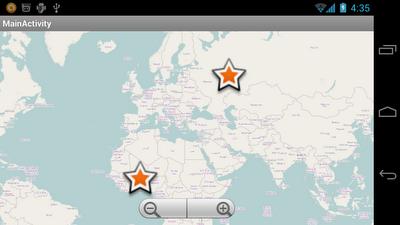
Example of implementing OpenStreetMap on Android using osmdroid

$
0
0
It's time to implement a simple app to display OpenStreetMap on Android using osmdroid.
Make sure copy the requested JARs to libs folder, and edit manifest to add the permissions

Modify the main layout to add <org.osmdroid.views.MapView>.


Modify the main activity:

package com.android_osmdroid;

import org.osmdroid.DefaultResourceProxyImpl;
import org.osmdroid.ResourceProxy;
import org.osmdroid.util.GeoPoint;
import org.osmdroid.views.MapView;
import android.os.Bundle;
import android.app.Activity;
import android.graphics.drawable.Drawable;

public class MainActivity extends Activity {

MyItemizedOverlay myItemizedOverlay = null;

@Override
public void onCreate(Bundle savedInstanceState) {
super.onCreate(savedInstanceState);
setContentView(R.layout.activity_main);
MapView mapView = (MapView) findViewById(R.id.mapview);
mapView.setBuiltInZoomControls(true);

Drawable marker=getResources().getDrawable(android.R.drawable.star_big_on);
int markerWidth = marker.getIntrinsicWidth();
int markerHeight = marker.getIntrinsicHeight();
marker.setBounds(0, markerHeight, markerWidth, 0);

ResourceProxy resourceProxy = new DefaultResourceProxyImpl(getApplicationContext());

myItemizedOverlay = new MyItemizedOverlay(marker, resourceProxy);
mapView.getOverlays().add(myItemizedOverlay);

GeoPoint myPoint1 = new GeoPoint(0*1000000, 0*1000000);
myItemizedOverlay.addItem(myPoint1, "myPoint1", "myPoint1");
GeoPoint myPoint2 = new GeoPoint(50*1000000, 50*1000000);
myItemizedOverlay.addItem(myPoint2, "myPoint2", "myPoint2");

}

}

Create a new class MyItemizedOverlay.java.

package com.android_osmdroid;

import java.util.ArrayList;

import org.osmdroid.ResourceProxy;
import org.osmdroid.api.IMapView;
import org.osmdroid.util.GeoPoint;
import org.osmdroid.views.overlay.ItemizedOverlay;
import org.osmdroid.views.overlay.OverlayItem;

import android.graphics.Point;
import android.graphics.drawable.Drawable;

public class MyItemizedOverlay extends ItemizedOverlay {

private ArrayList overlayItemList = new ArrayList();

public MyItemizedOverlay(Drawable pDefaultMarker,
ResourceProxy pResourceProxy) {
super(pDefaultMarker, pResourceProxy);
// TODO Auto-generated constructor stub
}

public void addItem(GeoPoint p, String title, String snippet){
OverlayItem newItem = new OverlayItem(title, snippet, p);
overlayItemList.add(newItem);
populate();
}

@Override
public boolean onSnapToItem(int arg0, int arg1, Point arg2, IMapView arg3) {
// TODO Auto-generated method stub
return false;
}

@Override
protected OverlayItem createItem(int arg0) {
// TODO Auto-generated method stub
return overlayItemList.get(arg0);
}

@Override
public int size() {
// TODO Auto-generated method stub
return overlayItemList.size();
}

}


OpenStreetMap on Android

OpenStreetMap on Android

Display image in WebView

$
0
0
If you are so lazy as me! Display image in WebView is a good choice.

Java Code:

package com.image.webview;

import android.os.Bundle;
import android.os.Environment;
import android.app.Activity;
import android.webkit.WebView;

public class MainActivity extends Activity {

WebView webView;
String imagePath = "/sunil.png";

@Override
public void onCreate(Bundle savedInstanceState) {
super.onCreate(savedInstanceState);
//setContentView(R.layout.activity_main);

webView = new WebView(this);
setContentView(webView);

String fullUrl = "file://"
+ Environment.getExternalStorageDirectory().getAbsolutePath().toString()
+ "/"
+ imagePath;
webView.loadUrl(fullUrl);
webView.getSettings().setBuiltInZoomControls(true);
webView.getSettings().setUseWideViewPort(true);
webView.getSettings().setLoadWithOverviewMode(true);

}

}

Need To add INTERNET permission.


 Cheers Guys!!

Resize bitmap: Bitmap.createScaledBitmap vs BitmapFactory.Options.inSampleSize

$
0
0
In this article, two approach are provided to resize bitmap:
- Bitmap.createScaledBitmap
- BitmapFactory.Options.inSampleSize

But...which one is better? In the code, the process time are also provided for reference.

java code:

package com.resize.image;

import android.app.Activity;
import android.graphics.Bitmap;
import android.graphics.BitmapFactory;
import android.os.Bundle;
import android.os.Environment;
import android.view.View;
import android.view.View.OnClickListener;
import android.widget.Button;
import android.widget.ImageView;
import android.widget.TextView;

public class MainActivity extends Activity {

Button btnProcessA, btnProcessB;
ImageView processedImgA, processedImgB;
TextView statusA, statusB;
String fullUrl=null;

/*
* Normally do not hardcode "/sdcard/";
* use Environment.getExternalStorageDirectory().getPath() instead
*/
static String imgSouce = "/sunil.png";

static int w = 250;
static int h = 250;

@Override
public void onCreate(Bundle savedInstanceState) {
super.onCreate(savedInstanceState);
setContentView(R.layout.main);

btnProcessA = (Button)findViewById(R.id.processbtna);
btnProcessB = (Button)findViewById(R.id.processbtnb);
processedImgA = (ImageView)findViewById(R.id.processedimg_a);
processedImgB = (ImageView)findViewById(R.id.processedimg_b);
statusA = (TextView)findViewById(R.id.statusa);
statusB = (TextView)findViewById(R.id.statusb);

btnProcessA.setOnClickListener(new OnClickListener(){

@Override
public void onClick(View v) {
resizeA();

}});

btnProcessB.setOnClickListener(new OnClickListener(){

@Override
public void onClick(View v) {
resizeB();

}});

}

private void resizeA(){

Long startTime = System.currentTimeMillis();
fullUrl = Environment.getExternalStorageDirectory().getAbsolutePath().toString()
+ "/"
+ imgSouce;
Bitmap bitmap_Source = BitmapFactory.decodeFile(fullUrl);
float factorH = h / (float)bitmap_Source.getHeight();
float factorW = w / (float)bitmap_Source.getWidth();
float factorToUse = (factorH > factorW) ? factorW : factorH;
Bitmap bm = Bitmap.createScaledBitmap(bitmap_Source,
(int) (bitmap_Source.getWidth() * factorToUse),
(int) (bitmap_Source.getHeight() * factorToUse),
false);

Long endTime = System.currentTimeMillis();
Long processTime = endTime - startTime;
statusA.setText("Process Time (MilliSeconds): " + String.valueOf(processTime));

processedImgA.setImageBitmap(bm);

}

private void resizeB(){

Long startTime = System.currentTimeMillis();

BitmapFactory.Options bmpFactoryOptions = new BitmapFactory.Options();
bmpFactoryOptions.inJustDecodeBounds = true;
Bitmap bm = BitmapFactory.decodeFile(fullUrl , bmpFactoryOptions);

int heightRatio = (int)Math.ceil(bmpFactoryOptions.outHeight/(float)h);
int widthRatio = (int)Math.ceil(bmpFactoryOptions.outWidth/(float)w);

if (heightRatio > 1 || widthRatio > 1)
{
if (heightRatio > widthRatio){
bmpFactoryOptions.inSampleSize = heightRatio;
} else {
bmpFactoryOptions.inSampleSize = widthRatio;
}
}

bmpFactoryOptions.inJustDecodeBounds = false;
bm = BitmapFactory.decodeFile(fullUrl, bmpFactoryOptions);

Long endTime = System.currentTimeMillis();
Long processTime = endTime - startTime;
statusB.setText("Process Time (MilliSeconds): " + String.valueOf(processTime));

processedImgB.setImageBitmap(bm);
}

}

xml code:


The Result is:
Cheers Guys!!
 

streaming video mediaplayer

$
0
0
My player have individual style. What features does the player have:
  • Nice MediaController. I don’t use MediaController from Android API.
  • New SeekBar style
  • Animation for MedeaController. If user don’t touch screen for the 5 seconds then MediaController slow disapears.

java code: Main Activity

package com.sunil.video;

import android.app.Activity;
import android.content.Intent;
import android.os.Bundle;
import android.util.Log;
import android.view.View;
import android.view.View.OnClickListener;
import android.widget.Button;

public class MainActivity extends Activity implements OnClickListener {

private static String TAG = "androidEx2";

private Button buttonVideoSample;

@Override
public void onCreate(Bundle savedInstanceState) {
super.onCreate(savedInstanceState);
Log.i(TAG, "onCreate");
setContentView(R.layout.main);

buttonVideoSample = (Button) findViewById(R.id.buttonVideoSample);
buttonVideoSample.setOnClickListener(this);
}

public void onClick(View v) {
if (v.getId() == R.id.buttonVideoSample) {
// **********************************
// HERE SET YOUR VIDEO URI
//String video_uri = "VIDEO_URI";
// For example: http://www.pocketjourney.com/downloads/pj/video/famous.3gp
// **********************************
String video_uri = "http://www.pocketjourney.com/downloads/pj/video/famous.3gp";
Intent intent = new Intent(this, VideoSample.class);
intent.putExtra("video_path", video_uri);
startActivity(intent);
}
}

}

Java Code: VideoSapmle

package com.sunil.video;

import java.io.IOException;
import java.util.Timer;
import java.util.TimerTask;

import android.app.Activity;
import android.media.MediaPlayer;
import android.media.MediaPlayer.OnBufferingUpdateListener;
import android.media.MediaPlayer.OnCompletionListener;
import android.media.MediaPlayer.OnPreparedListener;
import android.media.MediaPlayer.OnSeekCompleteListener;
import android.os.Bundle;
import android.util.Log;
import android.view.SurfaceHolder;
import android.view.SurfaceView;
import android.view.View;
import android.view.SurfaceHolder.Callback;
import android.view.View.OnClickListener;
import android.view.animation.Animation;
import android.view.animation.AnimationUtils;
import android.view.animation.Animation.AnimationListener;
import android.widget.ImageView;
import android.widget.LinearLayout;
import android.widget.ProgressBar;
import android.widget.SeekBar;
import android.widget.TextView;
import android.widget.Toast;
import android.widget.SeekBar.OnSeekBarChangeListener;


public class VideoSample extends Activity implements OnSeekBarChangeListener, Callback, OnPreparedListener, OnCompletionListener, OnBufferingUpdateListener,
OnClickListener, OnSeekCompleteListener, AnimationListener {
private TextView textViewPlayed;
private TextView textViewLength;
private SeekBar seekBarProgress;
private SurfaceView surfaceViewFrame;
private ImageView imageViewPauseIndicator;
private MediaPlayer player;
private SurfaceHolder holder;
private ProgressBar progressBarWait;
private Timer updateTimer;
private Bundle extras;
private Animation hideMediaController;
private LinearLayout linearLayoutMediaController;
private static final String TAG = "androidEx2 = VideoSample";

@Override
protected void onCreate(Bundle savedInstanceState) {
super.onCreate(savedInstanceState);
setContentView(R.layout.videosample);
extras = getIntent().getExtras();

linearLayoutMediaController = (LinearLayout) findViewById(R.id.linearLayoutMediaController);
linearLayoutMediaController.setVisibility(View.GONE);

hideMediaController = AnimationUtils.loadAnimation(this, R.anim.disapearing);
hideMediaController.setAnimationListener(this);

imageViewPauseIndicator = (ImageView) findViewById(R.id.imageViewPauseIndicator);
imageViewPauseIndicator.setVisibility(View.GONE);
if (player != null) {
if (!player.isPlaying()) {
imageViewPauseIndicator.setVisibility(View.VISIBLE);
}
}

textViewPlayed = (TextView) findViewById(R.id.textViewPlayed);
textViewLength = (TextView) findViewById(R.id.textViewLength);

surfaceViewFrame = (SurfaceView) findViewById(R.id.surfaceViewFrame);
surfaceViewFrame.setOnClickListener(this);
surfaceViewFrame.setClickable(false);

seekBarProgress = (SeekBar) findViewById(R.id.seekBarProgress);
seekBarProgress.setOnSeekBarChangeListener(this);
seekBarProgress.setProgress(0);

progressBarWait = (ProgressBar) findViewById(R.id.progressBarWait);

holder = surfaceViewFrame.getHolder();
holder.addCallback(this);
holder.setType(SurfaceHolder.SURFACE_TYPE_PUSH_BUFFERS);

player = new MediaPlayer();
player.setOnPreparedListener(this);
player.setOnCompletionListener(this);
player.setOnBufferingUpdateListener(this);
player.setOnSeekCompleteListener(this);
player.setScreenOnWhilePlaying(true);
player.setDisplay(holder);
}

private void playVideo() {
if (extras.getString("video_path").equals("VIDEO_URI")) {
showToast("Please, set the video URI in HelloAndroidActivity.java in onClick(View v) method");
} else {
new Thread(new Runnable() {
public void run() {
try {
player.setDataSource(extras.getString("video_path"));
player.prepare();
} catch (IllegalArgumentException e) {
showToast("Error while playing video");
Log.i(TAG, "========== IllegalArgumentException ===========");
e.printStackTrace();
} catch (IllegalStateException e) {
showToast("Error while playing video");
Log.i(TAG, "========== IllegalStateException ===========");
e.printStackTrace();
} catch (IOException e) {
showToast("Error while playing video. Please, check your network connection.");
Log.i(TAG, "========== IOException ===========");
e.printStackTrace();
}
}
}).start();
}
}

private void showToast(final String string) {
runOnUiThread(new Runnable() {
public void run() {
Toast.makeText(VideoSample.this, string, Toast.LENGTH_LONG).show();
finish();
}
});
}

private void hideMediaController() {
new Thread(new Runnable() {
public void run() {
try {
Thread.sleep(5000);
runOnUiThread(new Runnable() {
public void run() {
linearLayoutMediaController.startAnimation(hideMediaController);
}
});
} catch (InterruptedException e) {
// TODO Auto-generated catch block
e.printStackTrace();
}
}
}).start();
}

public void onProgressChanged(SeekBar seekBar, int progress, boolean fromUser) {
Log.i(TAG, "========== onProgressChanged : " + progress + " from user: " + fromUser);
if (!fromUser) {
textViewPlayed.setText(Utils.durationInSecondsToString(progress));
}
}

public void onStartTrackingTouch(SeekBar seekBar) {
// TODO Auto-generated method stub
}

public void onStopTrackingTouch(SeekBar seekBar) {
if (player.isPlaying()) {
progressBarWait.setVisibility(View.VISIBLE);
player.seekTo(seekBar.getProgress() * 1000);
Log.i(TAG, "========== SeekTo : " + seekBar.getProgress());
}
}

public void surfaceChanged(SurfaceHolder holder, int format, int width, int height) {
// TODO Auto-generated method stub

}

public void surfaceCreated(SurfaceHolder holder) {
playVideo();
}

public void surfaceDestroyed(SurfaceHolder holder) {
// TODO Auto-generated method stub

}

public void onPrepared(MediaPlayer mp) {
Log.i(TAG, "========== onPrepared ===========");
int duration = mp.getDuration() / 1000; // duration in seconds
seekBarProgress.setMax(duration);
textViewLength.setText(Utils.durationInSecondsToString(duration));
progressBarWait.setVisibility(View.GONE);

// Get the dimensions of the video
int videoWidth = player.getVideoWidth();
int videoHeight = player.getVideoHeight();
float videoProportion = (float) videoWidth / (float) videoHeight;
Log.i(TAG, "VIDEO SIZES: W: " + videoWidth + " H: " + videoHeight + " PROP: " + videoProportion);

// Get the width of the screen
int screenWidth = getWindowManager().getDefaultDisplay().getWidth();
int screenHeight = getWindowManager().getDefaultDisplay().getHeight();
float screenProportion = (float) screenWidth / (float) screenHeight;
Log.i(TAG, "VIDEO SIZES: W: " + screenWidth + " H: " + screenHeight + " PROP: " + screenProportion);

// Get the SurfaceView layout parameters
android.view.ViewGroup.LayoutParams lp = surfaceViewFrame.getLayoutParams();

if (videoProportion > screenProportion) {
lp.width = screenWidth;
lp.height = (int) ((float) screenWidth / videoProportion);
} else {
lp.width = (int) (videoProportion * (float) screenHeight);
lp.height = screenHeight;
}

// Commit the layout parameters
surfaceViewFrame.setLayoutParams(lp);

// Start video
if (!player.isPlaying()) {
player.start();
updateMediaProgress();
linearLayoutMediaController.setVisibility(View.VISIBLE);
hideMediaController();
}
surfaceViewFrame.setClickable(true);
}

public void onCompletion(MediaPlayer mp) {
mp.stop();
if (updateTimer != null) {
updateTimer.cancel();
}
finish();
}

/**
* Change progress of mediaController
* */
private void updateMediaProgress() {
updateTimer = new Timer("progress Updater");
updateTimer.scheduleAtFixedRate(new TimerTask() {
@Override
public void run() {
runOnUiThread(new Runnable() {
public void run() {
seekBarProgress.setProgress(player.getCurrentPosition() / 1000);
}
});
}
}, 0, 1000);
}

public void onBufferingUpdate(MediaPlayer mp, int percent) {
int progress = (int) ((float) mp.getDuration() * ((float) percent / (float) 100));
seekBarProgress.setSecondaryProgress(progress / 1000);
}

public void onClick(View v) {
if (v.getId() == R.id.surfaceViewFrame) {
if (linearLayoutMediaController.getVisibility() == View.GONE) {
linearLayoutMediaController.setVisibility(View.VISIBLE);
hideMediaController();
} else if (player != null) {
if (player.isPlaying()) {
player.pause();
imageViewPauseIndicator.setVisibility(View.VISIBLE);
} else {
player.start();
imageViewPauseIndicator.setVisibility(View.GONE);
}
}
}
}

public void onSeekComplete(MediaPlayer mp) {
progressBarWait.setVisibility(View.GONE);
}

public void onAnimationEnd(Animation animation) {
// TODO Auto-generated method stub

}

public void onAnimationRepeat(Animation animation) {
// TODO Auto-generated method stub

}

public void onAnimationStart(Animation animation) {
linearLayoutMediaController.setVisibility(View.GONE);
}
}
Main Layout:


VedioSaple Layout:


anim/disapearing.xml


drawable/seekbarcolors.xml


values/colors.xml


#FFFFFF
#5f5f5f
#141414
#a53130
#875e5e

dependency xml file inside your project folder( pom.xml)


4.0.0
com.hrupin.edu
androidEx2
0.0.1-SNAPSHOT
apk
androidEx2


com.google.android
android
2.2.1
provided


com.google.android.maps
maps
8_r2
provided


com.google.code.gson
gson
1.6
compile


junit
junit
4.0
test


com.jayway.maven.plugins.android.generation2
maven-android-plugin
2.8.3

${project.basedir}/AndroidManifest.xml
${project.basedir}/assets
${project.basedir}/res
${project.basedir}/src/main/native

8

true
true

true


maven-compiler-plugin
2.3.2

1.5
1.5


menifest.xml file


Here you can see the screenshot:
Android Sample Video Streaming player's screenshot

  Enjoy Guys!!

Image Upload on Server

$
0
0
Now in this example I will show you how to send an image file.

Java Code:

package com.example.imageuploadonserver;

import java.io.ByteArrayOutputStream;
import java.io.IOException;
import java.io.InputStream;
import java.util.ArrayList;
import org.apache.http.HttpResponse;
import org.apache.http.NameValuePair;
import org.apache.http.client.HttpClient;
import org.apache.http.client.entity.UrlEncodedFormEntity;
import org.apache.http.client.methods.HttpPost;
import org.apache.http.impl.client.DefaultHttpClient;
import org.apache.http.message.BasicNameValuePair;
import android.app.Activity;
import android.graphics.Bitmap;
import android.graphics.BitmapFactory;
import android.os.Bundle;
import android.widget.Toast;

public class UploadImage extends Activity {
InputStream inputStream;
@Override
public void onCreate(Bundle icicle) {
super.onCreate(icicle);
setContentView(R.layout.activity_image_upload);

Bitmap bitmap = BitmapFactory.decodeResource(getResources(),R.drawable.ic_launcher);
ByteArrayOutputStream stream = new ByteArrayOutputStream();
bitmap.compress(Bitmap.CompressFormat.PNG, 90, stream); //compress to which format you want.
byte [] byte_arr = stream.toByteArray();
String image_str = Base64.encodeBytes(byte_arr);
ArrayList nameValuePairs = new ArrayList();

nameValuePairs.add(new BasicNameValuePair("image",image_str));

try{
HttpClient httpclient = new DefaultHttpClient();
HttpPost httppost = new HttpPost("http://10.0.0.23/Upload_image_ANDROID/upload_image.php");
httppost.setEntity(new UrlEncodedFormEntity(nameValuePairs));
HttpResponse response = httpclient.execute(httppost);
String the_string_response = convertResponseToString(response);
Toast.makeText(UploadImage.this, "Response " + the_string_response, Toast.LENGTH_LONG).show();
}catch(Exception e){
Toast.makeText(UploadImage.this, "ERROR " + e.getMessage(), Toast.LENGTH_LONG).show();
System.out.println("Error in http connection "+e.toString());
}
}

public String convertResponseToString(HttpResponse response) throws IllegalStateException, IOException{

String res = "";
StringBuffer buffer = new StringBuffer();
inputStream = response.getEntity().getContent();
int contentLength = (int) response.getEntity().getContentLength(); //getting content length…..
Toast.makeText(UploadImage.this, "contentLength : " + contentLength, Toast.LENGTH_LONG).show();
if (contentLength < 0){
}
else{
byte[] data = new byte[512];
int len = 0;
try
{
while (-1 != (len = inputStream.read(data)) )
{
buffer.append(new String(data, 0, len)); //converting to string and appending to stringbuffer…..
}
}
catch (IOException e)
{
e.printStackTrace();
}
try
{
inputStream.close(); // closing the stream…..
}
catch (IOException e)
{
e.printStackTrace();
}
res = buffer.toString(); // converting stringbuffer to string…..

Toast.makeText(UploadImage.this, "Result : " + res, Toast.LENGTH_LONG).show();
//System.out.println("Response => " + EntityUtils.toString(response.getEntity()));
}
return res;
}
}

Base64 Code:


Now download a file fromhere which encodeBytes in Base64 Format. Put this file in the same package of UploadImage.java. See the screenshot.

Now the server part.
Create a folder named Upload_image_ANDROID in your htdocs folder and inside that create a file named upload_image.php and copy this code into it.


$base=$_REQUEST['image'];
$binary=base64_decode($base);
header('Content-Type: bitmap; charset=utf-8');
$file = fopen('uploaded_image.jpg', 'wb');
fwrite($file, $binary);
fclose($file);
echo 'Image upload complete!!, Please check your php file directory……';
?>

Save and Restore Instance State

$
0
0
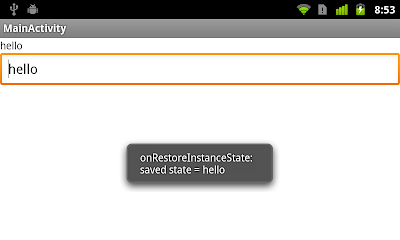
The methods onSaveInstanceState(Bundle outState) and onRestoreInstanceState(Bundle savedInstanceState) are the good place to Save and Restore Instance State.

  • onSaveInstanceState (Bundle outState)

    Called to retrieve per-instance state from an activity before being killed so that the state can be restored in onCreate(Bundle) or onRestoreInstanceState(Bundle) (the Bundle populated by this method will be passed to both).

    This method is called before an activity may be killed so that when it comes back some time in the future it can restore its state. For example, if activity B is launched in front of activity A, and at some point activity A is killed to reclaim resources, activity A will have a chance to save the current state of its user interface via this method so that when the user returns to activity A, the state of the user interface can be restored via onCreate(Bundle) or onRestoreInstanceState(Bundle).

    Do not confuse this method with activity lifecycle callbacks such as onPause(), which is always called when an activity is being placed in the background or on its way to destruction, or onStop() which is called before destruction. One example of when onPause() and onStop() is called and not this method is when a user navigates back from activity B to activity A: there is no need to call onSaveInstanceState(Bundle) on B because that particular instance will never be restored, so the system avoids calling it. An example when onPause() is called and not onSaveInstanceState(Bundle) is when activity B is launched in front of activity A: the system may avoid calling onSaveInstanceState(Bundle) on activity A if it isn't killed during the lifetime of B since the state of the user interface of A will stay intact.

    The default implementation takes care of most of the UI per-instance state for you by calling onSaveInstanceState() on each view in the hierarchy that has an id, and by saving the id of the currently focused view (all of which is restored by the default implementation of onRestoreInstanceState(Bundle)). If you override this method to save additional information not captured by each individual view, you will likely want to call through to the default implementation, otherwise be prepared to save all of the state of each view yourself.

    If called, this method will occur before onStop(). There are no guarantees about whether it will occur before or after onPause().

  • onRestoreInstanceState (Bundle savedInstanceState)

    This method is called after onStart() when the activity is being re-initialized from a previously saved state, given here in savedInstanceState. Most implementations will simply use onCreate(Bundle) to restore their state, but it is sometimes convenient to do it here after all of the initialization has been done or to allow subclasses to decide whether to use your default implementation. The default implementation of this method performs a restore of any view state that had previously been frozen by onSaveInstanceState(Bundle).

    This method is called between onStart() and onPostCreate(Bundle).

java code:

package com.example.androidsavestate;

import android.os.Bundle;
import android.app.Activity;
import android.view.Menu;
import android.widget.EditText;
import android.widget.TextView;
import android.widget.Toast;

public class MainActivity extends Activity {

TextView textviewSavedState;
EditText edittextEditState;

@Override
public void onCreate(Bundle savedInstanceState) {
super.onCreate(savedInstanceState);
setContentView(R.layout.activity_main);

textviewSavedState = (TextView)findViewById(R.id.savedstate);
edittextEditState = (EditText)findViewById(R.id.editstate);
}

@Override
protected void onRestoreInstanceState(Bundle savedInstanceState) {
// TODO Auto-generated method stub
super.onRestoreInstanceState(savedInstanceState);

String stateSaved = savedInstanceState.getString("saved_state");

if(stateSaved == null){
Toast.makeText(MainActivity.this,
"onRestoreInstanceState:\n" +
"NO state saved!",
Toast.LENGTH_LONG).show();
}else{
Toast.makeText(MainActivity.this,
"onRestoreInstanceState:\n" +
"saved state = " + stateSaved,
Toast.LENGTH_LONG).show();
textviewSavedState.setText(stateSaved);
edittextEditState.setText(stateSaved);
}

}

@Override
protected void onSaveInstanceState(Bundle outState) {
// TODO Auto-generated method stub
super.onSaveInstanceState(outState);

String stateToSave = edittextEditState.getText().toString();
outState.putString("saved_state", stateToSave);

Toast.makeText(MainActivity.this,
"onSaveInstanceState:\n" +
"saved_state = " + stateToSave,
Toast.LENGTH_LONG).show();
}

}


Save and Restore Instance State


Insert ImageView dynamically using Java code

$
0
0
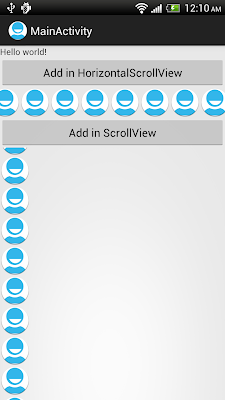
Here demonstrate how to create and add ImageView in LinearLayout (inside HorizontalScrollView/ScrollView) dynamically using Java code.
package com.example.androidinsertimages;

import android.os.Bundle;
import android.app.Activity;
import android.view.View;
import android.view.View.OnClickListener;
import android.widget.Button;
import android.widget.ImageView;
import android.widget.LinearLayout;

public class MainActivity extends Activity {

Button addinHorizontalScrollView, addinScrollView;
LinearLayout inHorizontalScrollView, inScrollView;

@Override
public void onCreate(Bundle savedInstanceState) {
super.onCreate(savedInstanceState);
setContentView(R.layout.activity_main);

inHorizontalScrollView = (LinearLayout)findViewById(R.id.inhorizontalscrollview);
inScrollView = (LinearLayout)findViewById(R.id.inscrollview);

addinHorizontalScrollView = (Button)findViewById(R.id.addinhorizontalscrollview);
addinHorizontalScrollView.setOnClickListener(new OnClickListener(){

@Override
public void onClick(View arg0) {
addImageView(inHorizontalScrollView);
}});

addinScrollView = (Button)findViewById(R.id.addinscrollview);
addinScrollView.setOnClickListener(new OnClickListener(){

@Override
public void onClick(View arg0) {
addImageView(inScrollView);
}});

}

private void addImageView(LinearLayout layout){
ImageView imageView = new ImageView(this);
imageView.setImageResource(R.drawable.ic_launcher);
layout.addView(imageView);
}

}

xml code:


Insert ImageView dynamically using Java code

Android Simple Calendar

$
0
0
In this tutorial, I am implementing the Calendar.

Java Code:

package com.examples;

import java.text.ParseException;
import java.text.SimpleDateFormat;
import java.util.ArrayList;
import java.util.Calendar;
import java.util.Date;
import java.util.GregorianCalendar;
import java.util.HashMap;
import java.util.List;
import java.util.Locale;

import android.app.Activity;
import android.content.Context;
import android.graphics.Color;
import android.os.Bundle;
import android.text.format.DateFormat;
import android.util.Log;
import android.view.LayoutInflater;
import android.view.View;
import android.view.ViewGroup;
import android.view.View.OnClickListener;
import android.widget.BaseAdapter;
import android.widget.Button;
import android.widget.GridView;
import android.widget.ImageView;
import android.widget.TextView;

public class SimpleCalendarViewActivity extends Activity implements OnClickListener
{
private static final String tag = "SimpleCalendarViewActivity";

private ImageView calendarToJournalButton;
private Button selectedDayMonthYearButton;
private Button currentMonth;
private ImageView prevMonth;
private ImageView nextMonth;
private GridView calendarView;
private GridCellAdapter adapter;
private Calendar _calendar;
private int month, year;
private final DateFormat dateFormatter = new DateFormat();
private static final String dateTemplate = "MMMM yyyy";

/** Called when the activity is first created. */
@Override
public void onCreate(Bundle savedInstanceState)
{
super.onCreate(savedInstanceState);
setContentView(R.layout.simple_calendar_view);

_calendar = Calendar.getInstance(Locale.getDefault());
month = _calendar.get(Calendar.MONTH) + 1;
year = _calendar.get(Calendar.YEAR);
Log.d(tag, "Calendar Instance:= " + "Month: " + month + " " + "Year: " + year);

selectedDayMonthYearButton = (Button) this.findViewById(R.id.selectedDayMonthYear);
selectedDayMonthYearButton.setText("Selected: ");

prevMonth = (ImageView) this.findViewById(R.id.prevMonth);
prevMonth.setOnClickListener(this);

currentMonth = (Button) this.findViewById(R.id.currentMonth);
currentMonth.setText(dateFormatter.format(dateTemplate, _calendar.getTime()));

nextMonth = (ImageView) this.findViewById(R.id.nextMonth);
nextMonth.setOnClickListener(this);

calendarView = (GridView) this.findViewById(R.id.calendar);

// Initialised
adapter = new GridCellAdapter(getApplicationContext(), R.id.calendar_day_gridcell, month, year);
adapter.notifyDataSetChanged();
calendarView.setAdapter(adapter);
}

/**
*
* @param month
* @param year
*/
private void setGridCellAdapterToDate(int month, int year)
{
adapter = new GridCellAdapter(getApplicationContext(), R.id.calendar_day_gridcell, month, year);
_calendar.set(year, month - 1, _calendar.get(Calendar.DAY_OF_MONTH));
currentMonth.setText(dateFormatter.format(dateTemplate, _calendar.getTime()));
adapter.notifyDataSetChanged();
calendarView.setAdapter(adapter);
}

@Override
public void onClick(View v)
{
if (v == prevMonth)
{
if (month <= 1)
{
month = 12;
year--;
}
else
{
month--;
}
Log.d(tag, "Setting Prev Month in GridCellAdapter: " + "Month: " + month + " Year: " + year);
setGridCellAdapterToDate(month, year);
}
if (v == nextMonth)
{
if (month > 11)
{
month = 1;
year++;
}
else
{
month++;
}
Log.d(tag, "Setting Next Month in GridCellAdapter: " + "Month: " + month + " Year: " + year);
setGridCellAdapterToDate(month, year);
}

}

@Override
public void onDestroy()
{
Log.d(tag, "Destroying View ...");
super.onDestroy();
}

// ///////////////////////////////////////////////////////////////////////////////////////
// Inner Class
public class GridCellAdapter extends BaseAdapter implements OnClickListener
{
private static final String tag = "GridCellAdapter";
private final Context _context;

private final List list;
private static final int DAY_OFFSET = 1;
private final String[] weekdays = new String[]{"Sun", "Mon", "Tue", "Wed", "Thu", "Fri", "Sat"};
private final String[] months = {"January", "February", "March", "April", "May", "June", "July", "August", "September", "October", "November", "December"};
private final int[] daysOfMonth = {31, 28, 31, 30, 31, 30, 31, 31, 30, 31, 30, 31};
private final int month, year;
private int daysInMonth, prevMonthDays;
private int currentDayOfMonth;
private int currentWeekDay;
private Button gridcell;
private TextView num_events_per_day;
private final HashMap eventsPerMonthMap;
private final SimpleDateFormat dateFormatter = new SimpleDateFormat("dd-MMM-yyyy");

// Days in Current Month
public GridCellAdapter(Context context, int textViewResourceId, int month, int year)
{
super();
this._context = context;
this.list = new ArrayList();
this.month = month;
this.year = year;

Log.d(tag, "==> Passed in Date FOR Month: " + month + " " + "Year: " + year);
Calendar calendar = Calendar.getInstance();
setCurrentDayOfMonth(calendar.get(Calendar.DAY_OF_MONTH));
setCurrentWeekDay(calendar.get(Calendar.DAY_OF_WEEK));
Log.d(tag, "New Calendar:= " + calendar.getTime().toString());
Log.d(tag, "CurrentDayOfWeek :" + getCurrentWeekDay());
Log.d(tag, "CurrentDayOfMonth :" + getCurrentDayOfMonth());

// Print Month
printMonth(month, year);

// Find Number of Events
eventsPerMonthMap = findNumberOfEventsPerMonth(year, month);
}
private String getMonthAsString(int i)
{
return months[i];
}

private String getWeekDayAsString(int i)
{
return weekdays[i];
}

private int getNumberOfDaysOfMonth(int i)
{
return daysOfMonth[i];
}

public String getItem(int position)
{
return list.get(position);
}

@Override
public int getCount()
{
return list.size();
}

/**
* Prints Month
*
* @param mm
* @param yy
*/
private void printMonth(int mm, int yy)
{
Log.d(tag, "==> printMonth: mm: " + mm + " " + "yy: " + yy);
// The number of days to leave blank at
// the start of this month.
int trailingSpaces = 0;
int leadSpaces = 0;
int daysInPrevMonth = 0;
int prevMonth = 0;
int prevYear = 0;
int nextMonth = 0;
int nextYear = 0;

int currentMonth = mm - 1;
String currentMonthName = getMonthAsString(currentMonth);
daysInMonth = getNumberOfDaysOfMonth(currentMonth);

Log.d(tag, "Current Month: " + " " + currentMonthName + " having " + daysInMonth + " days.");

// Gregorian Calendar : MINUS 1, set to FIRST OF MONTH
GregorianCalendar cal = new GregorianCalendar(yy, currentMonth, 1);
Log.d(tag, "Gregorian Calendar:= " + cal.getTime().toString());

if (currentMonth == 11)
{
prevMonth = currentMonth - 1;
daysInPrevMonth = getNumberOfDaysOfMonth(prevMonth);
nextMonth = 0;
prevYear = yy;
nextYear = yy + 1;
Log.d(tag, "*->PrevYear: " + prevYear + " PrevMonth:" + prevMonth + " NextMonth: " + nextMonth + " NextYear: " + nextYear);
}
else if (currentMonth == 0)
{
prevMonth = 11;
prevYear = yy - 1;
nextYear = yy;
daysInPrevMonth = getNumberOfDaysOfMonth(prevMonth);
nextMonth = 1;
Log.d(tag, "**--> PrevYear: " + prevYear + " PrevMonth:" + prevMonth + " NextMonth: " + nextMonth + " NextYear: " + nextYear);
}
else
{
prevMonth = currentMonth - 1;
nextMonth = currentMonth + 1;
nextYear = yy;
prevYear = yy;
daysInPrevMonth = getNumberOfDaysOfMonth(prevMonth);
Log.d(tag, "***---> PrevYear: " + prevYear + " PrevMonth:" + prevMonth + " NextMonth: " + nextMonth + " NextYear: " + nextYear);
}

// Compute how much to leave before before the first day of the
// month.
// getDay() returns 0 for Sunday.
int currentWeekDay = cal.get(Calendar.DAY_OF_WEEK) - 1;
trailingSpaces = currentWeekDay;

Log.d(tag, "Week Day:" + currentWeekDay + " is " + getWeekDayAsString(currentWeekDay));
Log.d(tag, "No. Trailing space to Add: " + trailingSpaces);
Log.d(tag, "No. of Days in Previous Month: " + daysInPrevMonth);

if (cal.isLeapYear(cal.get(Calendar.YEAR)) && mm == 1)
{
++daysInMonth;
}

// Trailing Month days
for (int i = 0; i < trailingSpaces; i++)
{
Log.d(tag, "PREV MONTH:= " + prevMonth + " => " + getMonthAsString(prevMonth) + " " + String.valueOf((daysInPrevMonth - trailingSpaces + DAY_OFFSET) + i));
list.add(String.valueOf((daysInPrevMonth - trailingSpaces + DAY_OFFSET) + i) + "-GREY" + "-" + getMonthAsString(prevMonth) + "-" + prevYear);
}

// Current Month Days
for (int i = 1; i <= daysInMonth; i++)
{
Log.d(currentMonthName, String.valueOf(i) + " " + getMonthAsString(currentMonth) + " " + yy);
if (i == getCurrentDayOfMonth())
{
list.add(String.valueOf(i) + "-BLUE" + "-" + getMonthAsString(currentMonth) + "-" + yy);
}
else
{
list.add(String.valueOf(i) + "-WHITE" + "-" + getMonthAsString(currentMonth) + "-" + yy);
}
}

// Leading Month days
for (int i = 0; i < list.size() % 7; i++)
{
Log.d(tag, "NEXT MONTH:= " + getMonthAsString(nextMonth));
list.add(String.valueOf(i + 1) + "-GREY" + "-" + getMonthAsString(nextMonth) + "-" + nextYear);
}
}

/**
* NOTE: YOU NEED TO IMPLEMENT THIS PART Given the YEAR, MONTH, retrieve
* ALL entries from a SQLite database for that month. Iterate over the
* List of All entries, and get the dateCreated, which is converted into
* day.
*
* @param year
* @param month
* @return
*/
private HashMap findNumberOfEventsPerMonth(int year, int month)
{
HashMap map = new HashMap();
// DateFormat dateFormatter2 = new DateFormat();
//
// String day = dateFormatter2.format("dd", dateCreated).toString();
//
// if (map.containsKey(day))
// {
// Integer val = (Integer) map.get(day) + 1;
// map.put(day, val);
// }
// else
// {
// map.put(day, 1);
// }
return map;
}

@Override
public long getItemId(int position)
{
return position;
}

@Override
public View getView(int position, View convertView, ViewGroup parent)
{
View row = convertView;
if (row == null)
{
LayoutInflater inflater = (LayoutInflater) _context.getSystemService(Context.LAYOUT_INFLATER_SERVICE);
row = inflater.inflate(R.layout.calendar_day_gridcell, parent, false);
}

// Get a reference to the Day gridcell
gridcell = (Button) row.findViewById(R.id.calendar_day_gridcell);
gridcell.setOnClickListener(this);

// ACCOUNT FOR SPACING

Log.d(tag, "Current Day: " + getCurrentDayOfMonth());
String[] day_color = list.get(position).split("-");
String theday = day_color[0];
String themonth = day_color[2];
String theyear = day_color[3];
if ((!eventsPerMonthMap.isEmpty()) && (eventsPerMonthMap != null))
{
if (eventsPerMonthMap.containsKey(theday))
{
num_events_per_day = (TextView) row.findViewById(R.id.num_events_per_day);
Integer numEvents = (Integer) eventsPerMonthMap.get(theday);
num_events_per_day.setText(numEvents.toString());
}
}

// Set the Day GridCell
gridcell.setText(theday);
gridcell.setTag(theday + "-" + themonth + "-" + theyear);
Log.d(tag, "Setting GridCell " + theday + "-" + themonth + "-" + theyear);

if (day_color[1].equals("GREY"))
{
gridcell.setTextColor(Color.LTGRAY);
}
if (day_color[1].equals("WHITE"))
{
gridcell.setTextColor(Color.WHITE);
}
if (day_color[1].equals("BLUE"))
{
gridcell.setTextColor(getResources().getColor(R.color.static_text_color));
}
return row;
}
@Override
public void onClick(View view)
{
String date_month_year = (String) view.getTag();
selectedDayMonthYearButton.setText("Selected: " + date_month_year);

try
{
Date parsedDate = dateFormatter.parse(date_month_year);
Log.d(tag, "Parsed Date: " + parsedDate.toString());

}
catch (ParseException e)
{
e.printStackTrace();
}
}

public int getCurrentDayOfMonth()
{
return currentDayOfMonth;
}

private void setCurrentDayOfMonth(int currentDayOfMonth)
{
this.currentDayOfMonth = currentDayOfMonth;
}
public void setCurrentWeekDay(int currentWeekDay)
{
this.currentWeekDay = currentWeekDay;
}
public int getCurrentWeekDay()
{
return currentWeekDay;
}
}
}

layout/simpl_calandar_view.xml


Calander_day_gridcell.xml


drawable/calendar_button_selected.xml


drawable/calendar_left_arrowsselected.xml


drawable/calendar_right_arrowseleceted.xml


values/style_calandar_events.xml


Blocking Incoming call - Android

$
0
0
Step 1:
Create Broadcast receiver class for incoming call
package com.javaorigin.android.sample;

import java.lang.reflect.Method;

import com.android.internal.telephony.ITelephony;

import android.content.BroadcastReceiver;
import android.content.Context;
import android.content.Intent
import android.telephony.TelephonyManager;
import android.util.Log;

public class PhoneCallReceiver extends BroadcastReceiver {
Context context = null;
private static final String TAG = "Phone call";
private ITelephony telephonyService;

@Override
public void onReceive(Context context, Intent intent) {
Log.v(TAG, "Receving....");
TelephonyManager telephony = (TelephonyManager)
context.getSystemService(Context.TELEPHONY_SERVICE);
try {
Class c = Class.forName(telephony.getClass().getName());
Method m = c.getDeclaredMethod("getITelephony");
m.setAccessible(true);
telephonyService = (ITelephony) m.invoke(telephony);
//telephonyService.silenceRinger();
telephonyService.endCall();
} catch (Exception e) {
e.printStackTrace();
}

}


}

Step 2:
Create IDL interface for getting core Telephony service
package name must be com.android.internal.telephony

FileName : ITelephony.aidl
package com.android.internal.telephony;

interface ITelephony {


boolean endCall();


void answerRingingCall();


void silenceRinger();

}

Step 3:
AndroidManifest.xml configuration


package="com.javaorigin.android.sample"
android:versionCode="1"
android:versionName="1.0">


Android SQLITE query selection example

$
0
0
In this example we are going to learn how to create a SQLite database adapter that will perform the basic operations such as creating the table, upgrading the database as well as providing access to the data based on given input parameters. SQLiteDatabase has methods to create, delete, execute SQL commands, and perform other common database management tasks.  To query a given table and return a Cursor over the result set you can use the following method.

  • public Cursor query (String table, String[] columns, String selection, String[] selectionArgs, String groupBy, String having, String orderBy, String limit)

Parameters
  • table 
    • The table name to compile the query against.
  • columns 
    • A list of which columns to return. Passing null will return all columns, which is discouraged to prevent reading data from storage that isn't going to be used.
  • selection 
    • A filter declaring which rows to return, formatted as an SQL WHERE clause (excluding the WHERE itself). Passing null will return all rows for the given table.
  • selectionArgs 
    • You may include ?s in selection, which will be replaced by the values from selectionArgs, in order that they appear in the selection. The values will be bound as Strings.
  • groupBy 
    • A filter declaring how to group rows, formatted as an SQL GROUP BY clause (excluding the GROUP BY itself). Passing null will cause the rows to not be grouped.
  • having 
    • A filter declare which row groups to include in the cursor, if row grouping is being used, formatted as an SQL HAVING clause (excluding the HAVING itself). Passing null will cause all row groups to be included, and is required when row grouping is not being used.
  • orderBy 
    • How to order the rows, formatted as an SQL ORDER BY clause (excluding the ORDER BY itself). Passing null will use the default sort order, which may be unordered.
  • limit 
    • Limits the number of rows returned by the query, formatted as LIMIT clause. Passing null denotes no LIMIT clause.
Returns
  • A Cursor object, which is positioned before the first entry. Note that Cursors are not synchronized


package com.as400samplecode.Util;

import java.io.StringReader;
import java.util.ArrayList;

import javax.xml.parsers.SAXParser;
import javax.xml.parsers.SAXParserFactory;

import org.xml.sax.InputSource;
import org.xml.sax.XMLReader;

import android.content.ContentValues;
import android.content.Context;
import android.database.Cursor;
import android.database.SQLException;
import android.database.sqlite.SQLiteDatabase;
import android.database.sqlite.SQLiteOpenHelper;
import android.database.sqlite.SQLiteStatement;
import android.util.Log;

public class OrderDetailDbAdapter {

public static final String KEY_ROWID = "_id";
public static final String KEY_STATUS = "statusCode";
public static final String KEY_COMPANY = "company";
public static final String KEY_ORDER = "orderNumber";
public static final String KEY_SEQ = "sequence";
public static final String KEY_ITEM = "item";
public static final String KEY_DESCRIPTION = "description";
public static final String KEY_QUANTITY = "quantity";
public static final String KEY_PRICE = "price";

private static final String TAG = "OrderDetailDbAdapter";
private DatabaseHelper mDbHelper;
private SQLiteDatabase mDb;

private static final String DATABASE_NAME = "OrderDatabase";
private static final String SQLITE_TABLE = "OrderDetail";
private static final int DATABASE_VERSION = 1;

private static final String DATABASE_CREATE =
"CREATE TABLE " + SQLITE_TABLE + " (" +
KEY_ROWID + " integer PRIMARY KEY autoincrement," +
KEY_STATUS + "," +
KEY_COMPANY + "," +
KEY_ORDER + "," +
KEY_SEQ + "," +
KEY_ITEM + "," +
KEY_DESCRIPTION + "," +
KEY_QUANTITY + "," +
KEY_PRICE + "," +
" UNIQUE (" + KEY_COMPANY + "," + KEY_ORDER + "," + KEY_SEQ + "," + KEY_ITEM +"));";


private final Context mCtx;

private static class DatabaseHelper extends SQLiteOpenHelper {

DatabaseHelper(Context context) {
super(context, DATABASE_NAME, null, DATABASE_VERSION);
}


@Override
public void onCreate(SQLiteDatabase db) {
Log.w(TAG, DATABASE_CREATE);
db.execSQL(DATABASE_CREATE);
}

@Override
public void onUpgrade(SQLiteDatabase db, int oldVersion, int newVersion) {
Log.w(TAG, "Upgrading database from version " + oldVersion + " to "
+ newVersion + ", which will destroy all old data");
db.execSQL("DROP TABLE IF EXISTS " + SQLITE_TABLE);
onCreate(db);
}
}

public OrderDetailDbAdapter(Context ctx) {
this.mCtx = ctx;
}

public OrderDetailDbAdapter open() throws SQLException {
mDbHelper = new DatabaseHelper(mCtx);
mDb = mDbHelper.getWritableDatabase();
return this;
}

public void close() {
if (mDbHelper != null) {
mDbHelper.close();
}
}


public long createOrderDetail() {
ContentValues initialValues = new ContentValues();
initialValues.put(KEY_STATUS, "A");
initialValues.put(KEY_COMPANY, "1");
initialValues.put(KEY_ORDER, "123");
initialValues.put(KEY_SEQ, "1");
initialValues.put(KEY_ITEM,"ABC");
initialValues.put(KEY_DESCRIPTION, "Item ABC description");
initialValues.put(KEY_QUANTITY, "100");
initialValues.put(KEY_PRICE, "99.99");
return mDb.insert(SQLITE_TABLE, null, initialValues);
}

public boolean deleteOrderDetail(long rowId) {

return mDb.delete(SQLITE_TABLE, KEY_ROWID + "=" + rowId, null) > 0;
}

public ArrayList getOrderDetails(String company, String orderNumber) throws SQLException {


ArrayList orderDetailList = new ArrayList();
Cursor mCursor =


mDb.query(true, SQLITE_TABLE, new String[] {
KEY_ROWID,
KEY_COMPANY,
KEY_ORDER,
KEY_SEQ,
KEY_ITEM,
KEY_DESCRIPTION,
KEY_QUANTITY,
KEY_PRICE,},
KEY_COMPANY + "=?" + " and " +
KEY_ORDER + "=?",
new String[] {company,orderNumber},
null, null, KEY_ITEM , null);


if (mCursor.moveToFirst()) {
do {
OrderDetail orderDetail = new OrderDetail();
orderDetail.setItem(mCursor.getString(mCursor.getColumnIndexOrThrow(KEY_ITEM)));
orderDetail.setDescription(mCursor.getString(mCursor.getColumnIndexOrThrow(KEY_DESCRIPTION)));
orderDetail.setQuantity(mCursor.getString(mCursor.getColumnIndexOrThrow(KEY_QUANTITY)));
orderDetail.setPrice(mCursor.getString(mCursor.getColumnIndexOrThrow(KEY_PRICE)));
orderDetailList.add(orderDetail);
} while (mCursor.moveToNext());
}
if (mCursor != null && !mCursor.isClosed()) {
mCursor.close();
}
return orderDetailList;


}


public boolean deleteAllOrderDetails() {

int doneDelete = 0;
doneDelete = mDb.delete(SQLITE_TABLE, null , null);
Log.w(TAG, Integer.toString(doneDelete));
return doneDelete > 0;

}

}

Android ListView Checkbox Example - OnItemClickListener() and OnClickListener()

$
0
0
In this example we are going to place a Checkbox inside the ListView row along with some Text. The concept is the same if you want to place a button or an image or all of them. The first issue that I faced when placing a Checkbox is the OnItemClickListener stopped working. To get around that you have to specify android:focusable="false" and android:focusableInTouchMode="false" for your checkbox view. Now to listen for the click event on the checkbox you have attach the OnClickListener when the you are inflating the custom layout inside your getView() method. To find out what all checkboxes are selected just loop thru the ArrayList that is being maintained by listening to the onClick event for the checkbox.

Source for Activity - ListViewCheckboxesActivity.java

package com.as400samplecode;

import java.util.ArrayList;

import android.app.Activity;
import android.content.Context;
import android.os.Bundle;
import android.util.Log;
import android.view.LayoutInflater;
import android.view.View;
import android.view.ViewGroup;
import android.view.View.OnClickListener;
import android.widget.AdapterView;
import android.widget.ArrayAdapter;
import android.widget.Button;
import android.widget.CheckBox;
import android.widget.ListView;
import android.widget.TextView;
import android.widget.Toast;
import android.widget.AdapterView.OnItemClickListener;

public class ListViewCheckboxesActivity extends Activity {

MyCustomAdapter dataAdapter = null;

@Override
public void onCreate(Bundle savedInstanceState) {
super.onCreate(savedInstanceState);
setContentView(R.layout.main);

//Generate list View from ArrayList
displayListView();

checkButtonClick();

}

private void displayListView() {

//Array list of countries
ArrayList countryList = new ArrayList();
Country country = new Country("AFG","Afghanistan",false);
countryList.add(country);
country = new Country("ALB","Albania",true);
countryList.add(country);
country = new Country("DZA","Algeria",false);
countryList.add(country);
country = new Country("ASM","American Samoa",true);
countryList.add(country);
country = new Country("AND","Andorra",true);
countryList.add(country);
country = new Country("AGO","Angola",false);
countryList.add(country);
country = new Country("AIA","Anguilla",false);
countryList.add(country);

//create an ArrayAdaptar from the String Array
dataAdapter = new MyCustomAdapter(this,
R.layout.country_info, countryList);
ListView listView = (ListView) findViewById(R.id.listView1);
// Assign adapter to ListView
listView.setAdapter(dataAdapter);


listView.setOnItemClickListener(new OnItemClickListener() {
public void onItemClick(AdapterView parent, View view,
int position, long id) {
// When clicked, show a toast with the TextView text
Country country = (Country) parent.getItemAtPosition(position);
Toast.makeText(getApplicationContext(),
"Clicked on Row: " + country.getName(),
Toast.LENGTH_LONG).show();
}
});

}

private class MyCustomAdapter extends ArrayAdapter {

private ArrayList countryList;

public MyCustomAdapter(Context context, int textViewResourceId,
ArrayList countryList) {
super(context, textViewResourceId, countryList);
this.countryList = new ArrayList();
this.countryList.addAll(countryList);
}

private class ViewHolder {
TextView code;
CheckBox name;
}

@Override
public View getView(int position, View convertView, ViewGroup parent) {

ViewHolder holder = null;
Log.v("ConvertView", String.valueOf(position));

if (convertView == null) {
LayoutInflater vi = (LayoutInflater)getSystemService(
Context.LAYOUT_INFLATER_SERVICE);
convertView = vi.inflate(R.layout.country_info, null);

holder = new ViewHolder();
holder.code = (TextView) convertView.findViewById(R.id.code);
holder.name = (CheckBox) convertView.findViewById(R.id.checkBox1);
convertView.setTag(holder);

holder.name.setOnClickListener( new View.OnClickListener() {
public void onClick(View v) {
CheckBox cb = (CheckBox) v ;
Country country = (Country) cb.getTag();
Toast.makeText(getApplicationContext(),
"Clicked on Checkbox: " + cb.getText() +
" is " + cb.isChecked(),
Toast.LENGTH_LONG).show();
country.setSelected(cb.isChecked());
}
});
}
else {
holder = (ViewHolder) convertView.getTag();
}

Country country = countryList.get(position);
holder.code.setText(" (" + country.getCode() + ")");
holder.name.setText(country.getName());
holder.name.setChecked(country.isSelected());
holder.name.setTag(country);

return convertView;

}

}

private void checkButtonClick() {


Button myButton = (Button) findViewById(R.id.findSelected);
myButton.setOnClickListener(new OnClickListener() {

@Override
public void onClick(View v) {
StringBuffer responseText = new StringBuffer();
responseText.append("The following were selected...\n");

ArrayList countryList = dataAdapter.countryList;
use for loop i=0 to < countryList.size(){
Country country = countryList.get(i);
if(country.isSelected()){
responseText.append("\n" + country.getName());
}
}

Toast.makeText(getApplicationContext(),
responseText, Toast.LENGTH_LONG).show();

}
});

}

}

Source for POJO - Country.java


package com.as400samplecode;

public class Country {

String code = null;
String name = null;
boolean selected = false;

public Country(String code, String name, boolean selected) {
super();
this.code = code;
this.name = name;
this.selected = selected;
}

public String getCode() {
return code;
}
public void setCode(String code) {
this.code = code;
}
public String getName() {
return name;
}
public void setName(String name) {
this.name = name;
}

public boolean isSelected() {
return selected;
}
public void setSelected(boolean selected) {
this.selected = selected;
}

}

Source for Main Screen Layout - main.xml


Source for Custom List Layout - country_info.xml


Source for application variables - strings.xml


ListView Checkboxes

Some North American Countries!


Source for application manifest - AndroidManifest.xml


Android ListView Checkbox Example

Handling Shake Events

$
0
0
Here is my implementation of shake detection for android.

package com.android.sensor;

import java.util.List;

import android.hardware.Sensor;
import android.hardware.SensorEvent;
import android.hardware.SensorEventListener;
import android.hardware.SensorManager;
import android.util.Log;

public class AccelerometerListener implements SensorEventListener {

private SensorManager sensorManager;
private List sensors;
private Sensor sensor;
private long lastUpdate = -1;
private long currentTime = -1;

private float last_x, last_y, last_z;
private float current_x, current_y, current_z, currenForce;
private static final int FORCE_THRESHOLD = 900;
private final int DATA_X = SensorManager.DATA_X;
private final int DATA_Y = SensorManager.DATA_Y;
private final int DATA_Z = SensorManager.DATA_Z;

public AccelerometerListener(Activity parent) {
SensorManager sensorService = (SensorManager) parent.getSystemService(Context.SENSOR_SERVICE);
this.sensorManager = sensorManager;
this.subscriber = subscriber;
this.sensors = sensorManager.getSensorList(Sensor.TYPE_ACCELEROMETER);
if (sensors.size() > 0) {
sensor = sensors.get(0);
}
}
public void start () {
if (sensor!=null) {
sensorManager.registerListener(this, sensor, SensorManager.SENSOR_DELAY_GAME);
}
}

public void stop () {
sensorManager.unregisterListener(this);
}

public void onAccuracyChanged(Sensor s, int valu) {


}
public void onSensorChanged(SensorEvent event) {

if (event.sensor.getType() != Sensor.TYPE_ACCELEROMETER || event.values.length < 3)
return;

currentTime = System.currentTimeMillis();

if ((currentTime - lastUpdate) > 100) {
long diffTime = (currentTime - lastUpdate);
lastUpdate = currentTime;

current_x = event.values[DATA_X];
current_y = event.values[DATA_Y];
current_z = event.values[DATA_Z];

currenForce = Math.abs(current_x+current_y+current_z - last_x - last_y - last_z) / diffTime * 10000;

if (currenForce > FORCE_THRESHOLD) {

// Device has been shaken now go on and do something
// you could now inform the parent activity ...

}
last_x = current_x;
last_y = current_y;
last_z = current_z;

}
}

}
Viewing all 106 articles
Browse latest View live